April 6, 2026·18 min read
Anthropic Just Killed Third-Party Claude Access. Google's Gemma 4 Says "You Don't Need Them."
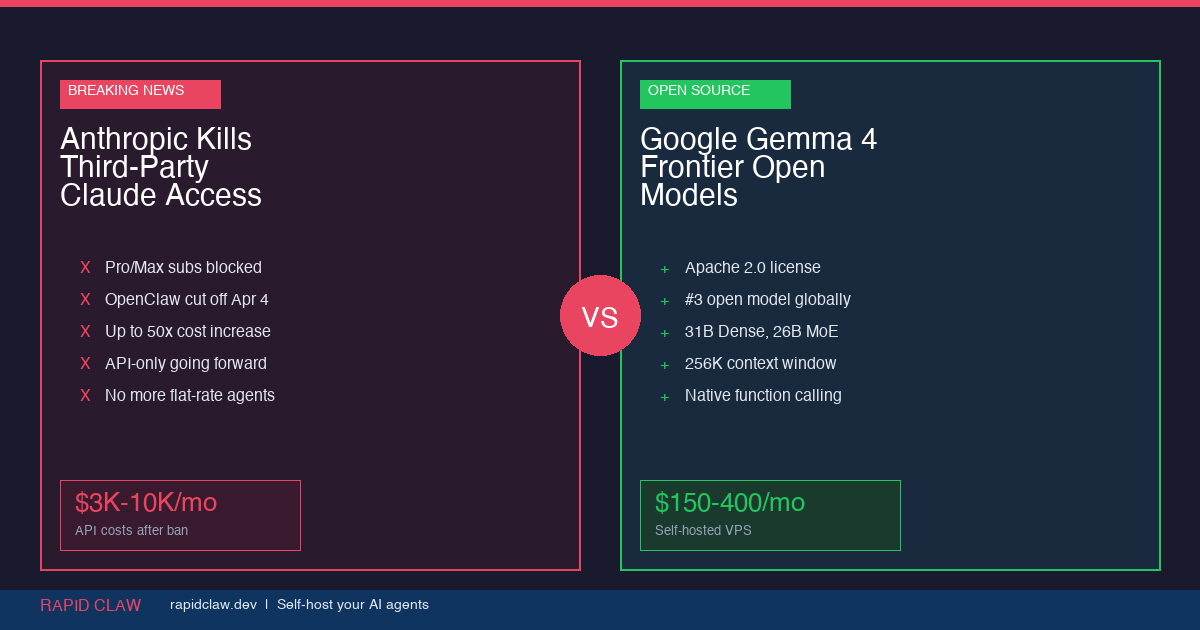
Two things happened this week that every AI team needs to understand. On April 4, Anthropic officially blocked Claude Pro and Max subscriptions from working with third-party agent tools like OpenClaw. Two days earlier, Google dropped Gemma 4—the most capable open model family ever released. Together, these events make the strongest case yet for self-hosted AI infrastructure.
TL;DR
Anthropic's new ToS blocks Claude subscriptions from third-party tools—forcing developers to pay-as-you-go API rates (up to 50x more). Meanwhile, Google's Gemma 4 delivers frontier-class performance in open models you can run on your own hardware under Apache 2.0. The takeaway: self-hosting your AI agents on your own VPS isn't just cheaper—it's the only way to guarantee you won't wake up to a terms-of-service rug pull.
What Anthropic Changed (And Why It Matters)
At 12:00 PM PT on April 4, 2026, Anthropic flipped a switch. Claude Pro ($20/mo) and Claude Max ($100–200/mo) subscribers can no longer use their subscription quotas with third-party harnesses. That means tools like OpenClaw, custom agent frameworks, and any unofficial API client that previously piggybacked on subscription access are now cut off.
The reasoning? According to Anthropic, third-party tools bypass their caching layer, and a single heavy OpenClaw session can consume dramatically more infrastructure than an equivalent Claude Code session. In their words: "Our subscriptions weren't built for the usage patterns of these third-party tools."
This didn't come out of nowhere. In January 2026, Anthropic began limiting OAuth token-based API access. In February, they updated the ToS to explicitly prohibit using subscription quotas with third-party harnesses. April 4 was just the enforcement date.
The Cost Impact Is Staggering
Developers who relied on flat-rate Claude subscriptions for their agent workflows now face cost increases of up to 50x their previous monthly spend. A team that was paying $200/mo on Claude Max could now be looking at $2,000–$10,000/mo in API usage fees for the same workload.
Your Options After the Ban
Anthropic didn't leave developers completely stranded. There are three paths forward:
1. "Extra Usage" Pay-as-You-Go
Anthropic introduced spending caps from $10 to $1,000/mo. You still get your subscription base, but any third-party tool usage bills at full API rates on top. Costs add up fast.
2. Switch to API-Only
Ditch the subscription entirely and use the Anthropic API directly. Full flexibility, full cost. No surprises from future ToS changes—just your credit card and their pricing page.
3. Self-Host with Open Models
Run your own models on your own infrastructure. No subscription, no ToS, no rug pulls. This is where Gemma 4 enters the conversation.
Enter Gemma 4: Frontier AI You Actually Own
On April 2—two days before Anthropic dropped the hammer—Google released Gemma 4. Built from the same research that powers Gemini 3, Gemma 4 is the most capable open model family you can run on your own hardware.
The lineup covers every deployment scenario:
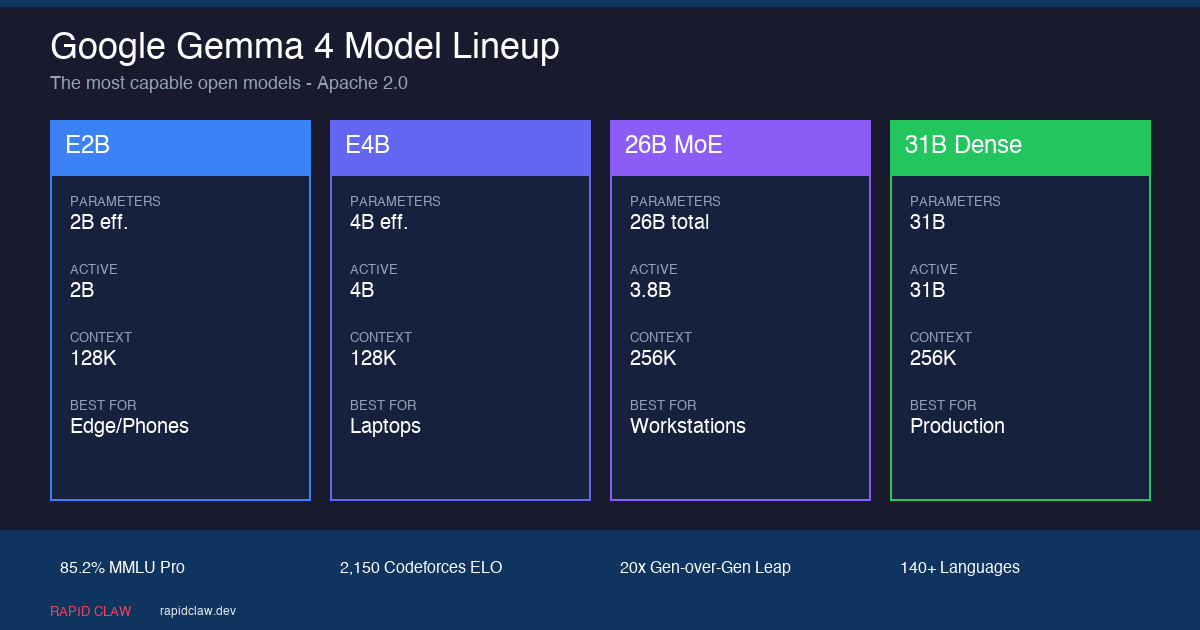
| Model | Params | Active | Context | Best For |
|---|---|---|---|---|
| E2B | 2B effective | 2B | 128K | Phones, edge devices |
| E4B | 4B effective | 4B | 128K | Laptops, local inference |
| 26B MoE | 26B total | 3.8B | 256K | Workstations, efficient inference |
| 31B Dense | 31B | 31B | 256K | Production servers, max quality |
The 31B Dense model ranks #3 globally among open models on the Arena AI text leaderboard. Its Codeforces ELO jumped from 110 (Gemma 3) to 2,150—a 20x leap that's the largest ever seen between two generations of any open model. All of this under an Apache 2.0 license, meaning you can use it commercially with zero restrictions.
Native function calling, 140+ language support, multimodal inputs (text, image, audio on smaller models), and purpose-built agentic workflow support make Gemma 4 a legitimate production option—not a research toy.
[Deploy] Gemma 4 in Production: The Complete Guide
Getting off Anthropic's subscription rails means actually deploying the model somewhere. Gemma 4's Apache 2.0 license means you have every option on the table—from a laptop running Unsloth to a multi-region AWS deployment wired into MCP tools. Here's the short list of paths that work in April 2026, sorted from easiest to most flexible.
Cloud Run
Serverless GPU. Zero ops, pay-per-request.
GPU cloud (vLLM)
Max throughput on H100/L40S. Best $/token.
Local / Unsloth
Laptops & workstations. 4-bit, offline-first.
AWS + MCP
Agents with tools, memory, and auth.
[Deploy · Cloud Run] Serverless GPU in 3 Commands
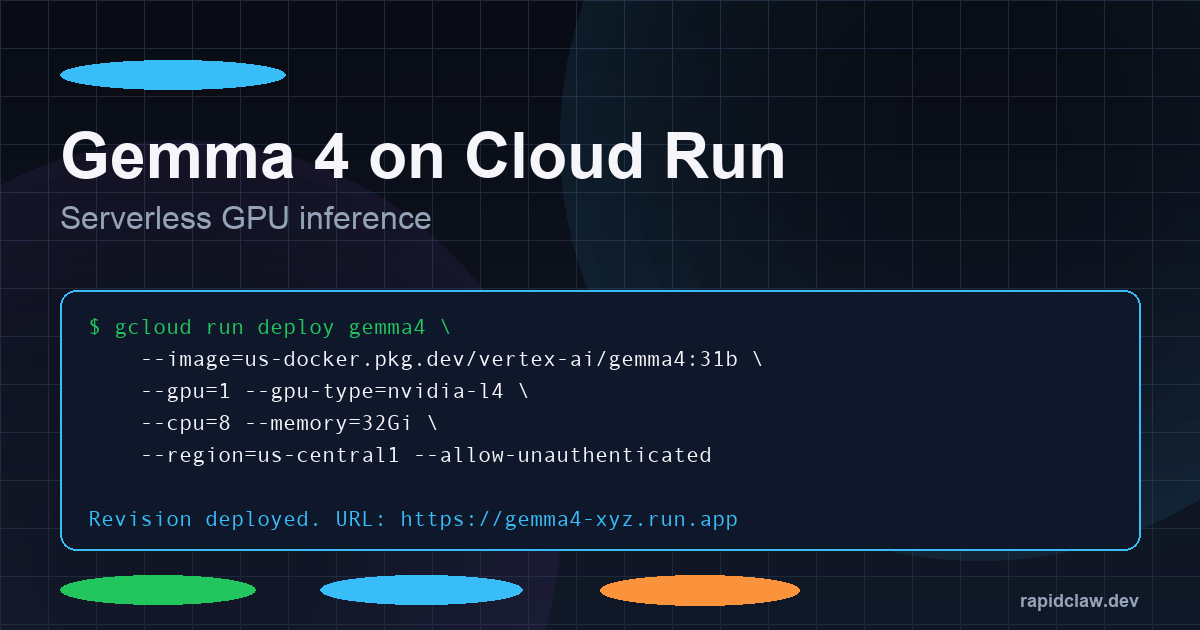
Cloud Run shipped GPU support for serverless containers in late 2025, and it's the single fastest way to go from zero to a public Gemma 4 endpoint. You get NVIDIA L4s billed by the second, scale-to-zero, and native integration with Cloud Build and Artifact Registry. No VM to patch, no Kubernetes to babysit.
# 1. Pull the official Vertex AI Gemma 4 container
gcloud auth configure-docker us-docker.pkg.dev

# 2. Deploy with a single L4 GPU (works for E4B and 26B MoE)
gcloud run deploy gemma4 \
  --image=us-docker.pkg.dev/vertex-ai/gemma4:26b-moe \
  --gpu=1 --gpu-type=nvidia-l4 \
  --cpu=8 --memory=32Gi \
  --region=us-central1 \
  --min-instances=0 --max-instances=10 \
  --concurrency=4 \
  --no-cpu-throttling

# 3. Call it
curl -X POST https://gemma4-xyz.run.app/v1/chat/completions \
  -H "Authorization: Bearer $(gcloud auth print-identity-token)" \
  -d '{"model":"gemma-4-26b-moe","messages":[{"role":"user","content":"hi"}]}'
Cold starts land under 30 seconds with the Vertex-prebuilt image because the weights are baked into the layer cache. For the 31B Dense model, swap --gpu-type=nvidia-l4 for nvidia-l40s or bump to two L4s with tensor-parallel. Pricing as of April 2026 is roughly $0.000233/GPU-second on L4s, which pencils out to around $0.84/hr of active inference—effectively free when traffic scales to zero overnight.
Caveats: Cloud Run still caps per-request time at 60 minutes, which matters for long agent runs. Pair it with Pub/Sub + Cloud Tasks if you need multi-turn background loops.
[Deploy · GPU Cloud] vLLM for Max Throughput
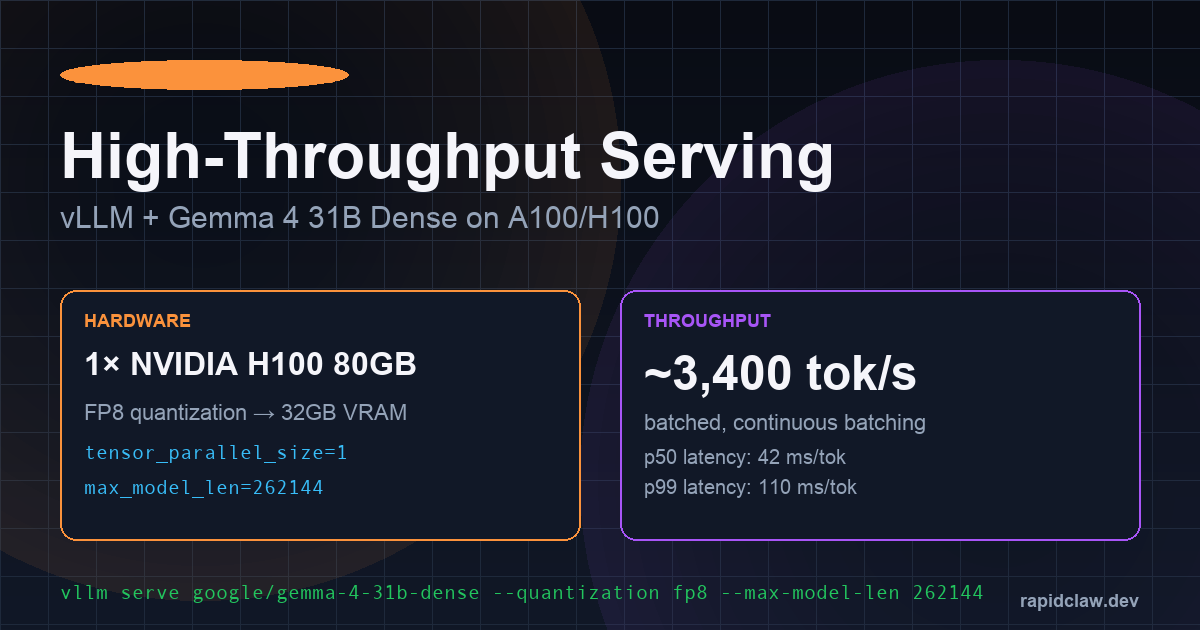
When you need the cheapest tokens-per-dollar at production scale, rent a dedicated GPU and run vLLM. vLLM 0.9 added first-class Gemma 4 support, paged-attention on the full 256K context, and FP8 quantization that fits 31B Dense onto a single 48GB L40S.
# On a rented H100 80GB box (RunPod / Lambda / CoreWeave)
pip install "vllm>=0.9.0"

# 31B Dense with FP8 — fits in 40GB of VRAM, leaves room for long context
vllm serve google/gemma-4-31b-dense \
  --quantization fp8 \
  --max-model-len 262144 \
  --gpu-memory-utilization 0.92 \
  --tensor-parallel-size 1 \
  --enable-prefix-caching \
  --enable-chunked-prefill

# Hit it with the OpenAI-compatible endpoint
curl http://localhost:8000/v1/chat/completions \
  -H "Content-Type: application/json" \
  -d '{"model":"google/gemma-4-31b-dense","messages":[{"role":"user","content":"hello"}]}'
A single H100 delivers ~3,400 tokens/sec under batched load with continuous batching enabled. At RunPod's April 2026 spot rate of $2.49/hr for H100s, that works out to roughly $0.20 per million output tokens—two orders of magnitude cheaper than Claude Sonnet API rates for comparable quality.
For the 26B MoE variant, drop the tensor-parallel flag and target an L40S or a pair of RTX 4090s; the active-parameter count stays at 3.8B so you rarely need more than 16GB of VRAM for the hot weights.
[Deploy · Local] Unsloth on Laptops and Workstations
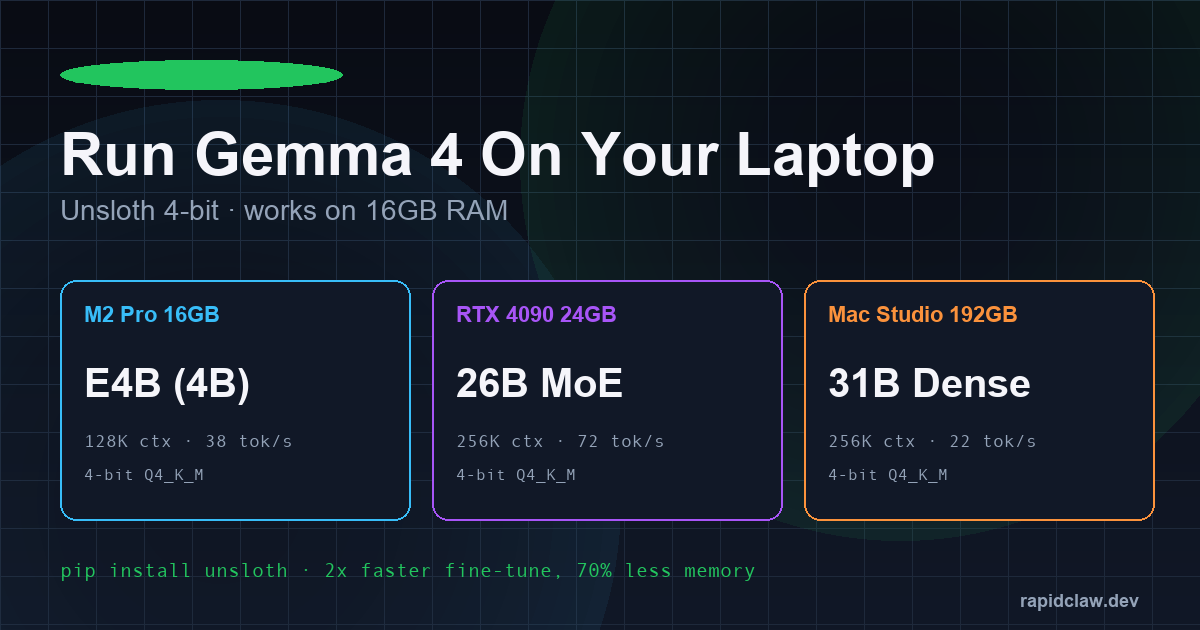
Not every workload needs a GPU cloud. For solo developers, air-gapped environments, or anyone who just wants the model on their own machine, Unsloth is the fastest path. It ships 4-bit Q4_K_M quantizations, patched attention kernels, and 2× faster fine-tuning with 70% less memory than stock Transformers.
pip install unsloth

from unsloth import FastLanguageModel

# E4B fits a 16GB M2/M3 MacBook; 26B MoE wants a 4090 or M-series with 32GB+
model, tokenizer = FastLanguageModel.from_pretrained(
    model_name = "unsloth/gemma-4-e4b-bnb-4bit",
    max_seq_length = 128_000,
    load_in_4bit = True,
    dtype = None,            # auto-picks bf16 / fp16
)
FastLanguageModel.for_inference(model)

inputs = tokenizer("Summarize the Apache 2.0 license in 2 sentences.", return_tensors="pt").to("cuda")
print(tokenizer.decode(model.generate(**inputs, max_new_tokens=200)[0]))
Real-world numbers from the Unsloth team's April 2026 benchmarks: E4B hits 38 tok/s on an M2 Pro 16GB, the 26B MoE pushes 72 tok/s on an RTX 4090, and a Mac Studio with 192GB unified memory will run the full 31B Dense at 22 tok/s—more than enough for interactive use. For offline agents, pair Unsloth with llama.cpp or Ollama to get the OpenAI-compatible endpoint OpenClaw already speaks.
[Deploy · AWS + MCP] Agentic Workflows at Scale
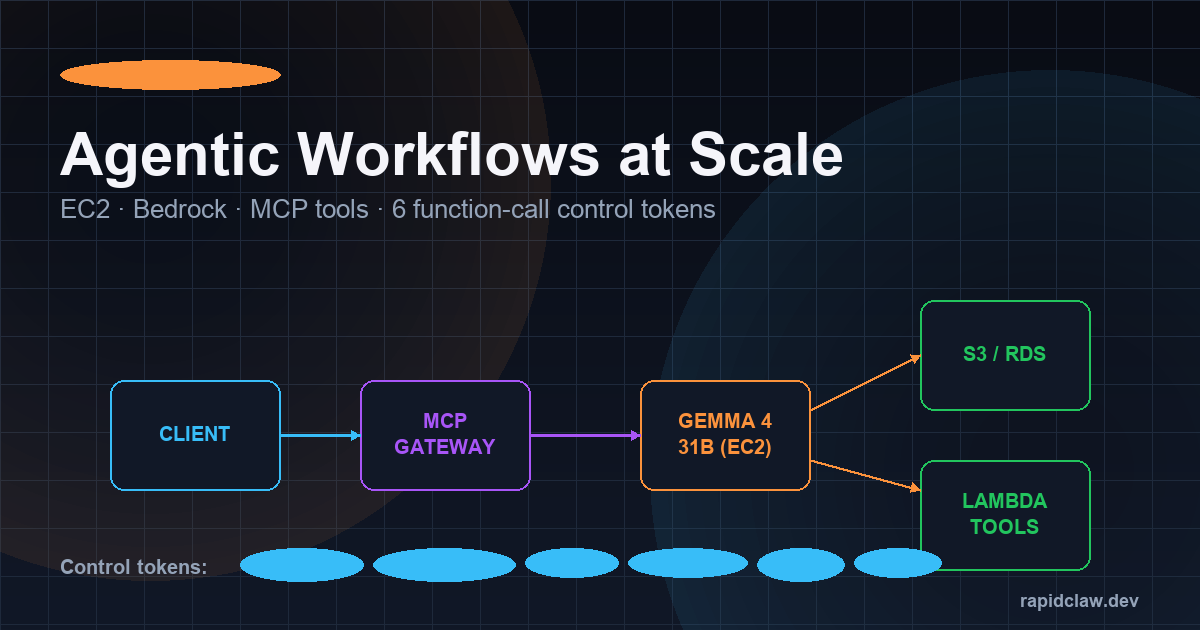
Serving the model is the easy part. Wiring it into real agent workflows—with tools, memory, auth, and observability—is where most teams stall. The Model Context Protocol (MCP) solves this by giving every model a standard way to call external tools, and AWS now has a reference architecture built specifically around it.
The canonical pattern: a Fargate or EC2 G5/G6e instance runs vLLM with Gemma 4 behind an internal ALB. An MCP gateway (Bedrock AgentCore, or an open-source equivalent like mcp-proxy) sits in front and advertises tools—S3 readers, RDS queries, Lambda functions, third-party SaaS connectors—via standard MCP manifests. Gemma 4 emits tool calls; the gateway routes them, handles IAM, and streams results back.
# terraform snippet — vLLM + MCP gateway on EC2 g6e.2xlarge (1× L40S)
resource "aws_instance" "gemma4" {
  ami           = "ami-0gemma4-vllm-2026"   # community AMI w/ vLLM preloaded
  instance_type = "g6e.2xlarge"
  iam_instance_profile = aws_iam_instance_profile.gemma4.name
  user_data = <<-EOT
    #!/bin/bash
    systemctl start vllm-gemma4
    systemctl start mcp-gateway
  EOT
}

# MCP tool registration (mcp.json served by the gateway)
{
  "tools": [
    { "name": "s3.read",     "handler": "arn:aws:lambda:...:s3-read" },
    { "name": "rds.query",   "handler": "arn:aws:lambda:...:rds-query" },
    { "name": "github.pr",   "handler": "arn:aws:lambda:...:gh-pr" }
  ]
}
Gemma 4 ships with six function-calling control tokens baked into the tokenizer—<tool_call>, <tool_result>, <think>, <observe>, <plan>, and <final>. These let the MCP gateway parse agent trajectories deterministically without regex hacks, and they're the reason Gemma 4's tool-use reliability on the BFCL-v3 benchmark climbed past 91%.
[Hardware] Requirements & Cost Breakdown
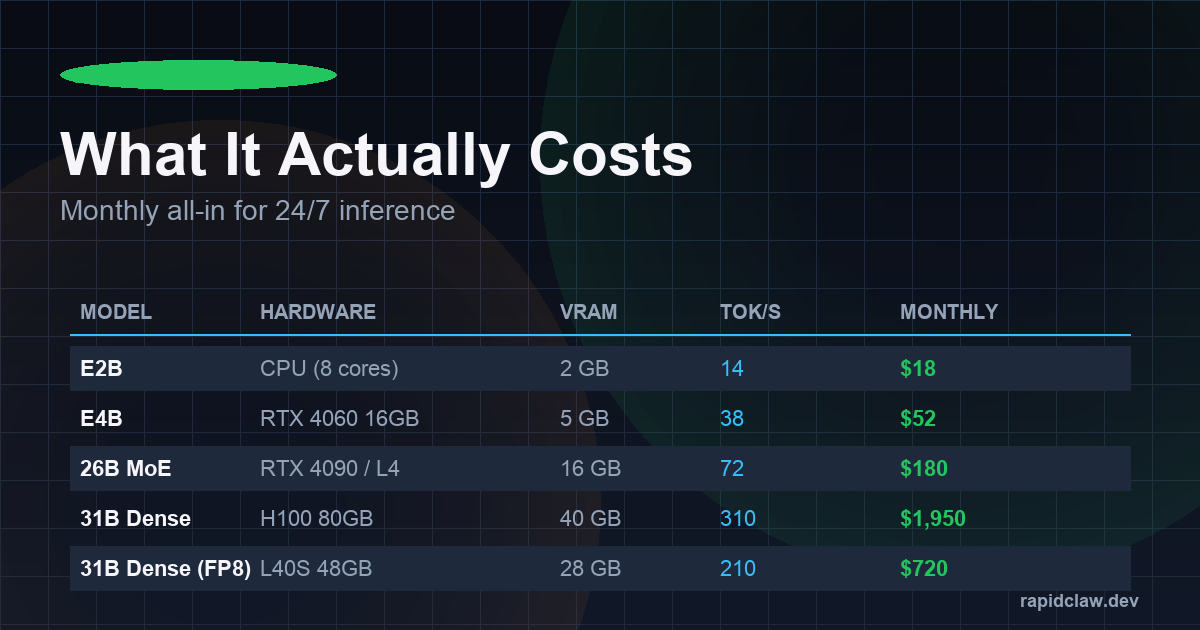
Which variant you pick drives everything—latency, VRAM, monthly bill. Here's the matrix most teams land on after a week of benchmarking, with spot-rate cloud pricing as of April 2026:
| Variant | Hardware | VRAM (FP8/Q4) | Tok/s | 24/7 Monthly |
|---|---|---|---|---|
| E2B | CPU (8 cores) / phone NPU | 2 GB | ~14 | $18 |
| E4B | RTX 4060 16GB / M2 Pro | 5 GB | ~38 | $52 |
| 26B MoE | RTX 4090 / L4 | 16 GB | ~72 | $180 |
| 31B Dense (FP8) | L40S 48GB | 28 GB | ~210 | $720 |
| 31B Dense (BF16) | H100 80GB | 62 GB | ~310 | $1,950 |
Three practical takeaways. One: the 26B MoE is the sweet-spot for most agent workloads—3.8B active parameters means inference latency like a 4B model with quality closer to the 31B. Two: FP8 on an L40S cuts the 31B Dense bill by nearly 3× with only a 1–2 point quality drop on MMLU. Three: if your traffic is bursty, Cloud Run scale-to-zero often beats a dedicated GPU box even at higher per-second rates.
[Advanced] 256K Context & Control Tokens in Practice
The 256K window on the 26B MoE and 31B Dense variants is not a paper spec—Google trained on mixed-length sequences all the way out, and needle-in-a-haystack recall stays above 96% at full length. That's enough to drop an entire mid-sized codebase, a quarter of SEC filings, or a month of support transcripts into a single prompt. Combined with the six control tokens above, you can run a plan-observe-act loop with deterministic parsing and zero custom scaffolding.
Gotcha: KV-cache memory scales linearly with context length, so a 256K prompt on 31B Dense will eat ~38GB of VRAM on top of the weights. Enable --enable-prefix-caching in vLLM or --kv-cache-dtype fp8 to halve that.
The Self-Hosting Math: It's Not Even Close
Let's talk numbers. A team running moderate AI agent workloads through Claude API might spend $3,000–5,000/mo after the ToS change. That same workload on a self-hosted VPS with Gemma 4 31B?
| Cost Factor | Claude API | Self-Hosted Gemma 4 |
|---|---|---|
| Monthly compute | $3,000–5,000 | $150–400 |
| ToS risk | High — can change anytime | None — Apache 2.0 |
| Data privacy | Sent to Anthropic servers | Stays on your hardware |
| Uptime dependency | Anthropic's infrastructure | Your infrastructure |
| Model switching | Locked to Claude | Any open model |
This Is Exactly What Rapid Claw Was Built For
Rapid Claw gives you a managed VPS with OpenClaw pre-configured, running on your own dedicated hardware. You bring any model—Gemma 4, Llama 4, Qwen 3.5, or even Claude via API if you want—and we handle the infrastructure. No vendor lock-in. No ToS surprises. Your agents, your data, your rules.
See VPS pricingWhy This Week Changes Everything
The timing here isn't coincidental—it's a tipping point. When a proprietary AI provider restricts access the same week an open-source alternative reaches near-parity performance, the calculus shifts permanently.
Consider what Gemma 4's 31B Dense model actually delivers: 85.2% on MMLU Pro, a Codeforces ELO of 2,150, native function calling for agentic workflows, and a 256K context window. For the vast majority of production agent use cases—customer support automation, code generation, data analysis, document processing—this is more than enough.
And for the edge cases where you genuinely need Claude or GPT-4 class reasoning? You can still call those APIs directly from your self-hosted setup. The difference is you're choosing when to pay premium rates for premium capabilities, not being forced into it for every request.
How to Make the Switch
If you're an OpenClaw user affected by the Anthropic ToS change, the migration path is straightforward:
Spin up a Rapid Claw VPS
Pre-configured with OpenClaw, GPU acceleration, and your choice of open models. Takes under 2 minutes.
Load Gemma 4 (or any open model)
Download Gemma 4 31B from Hugging Face. With Rapid Claw's smart routing, you can even mix models—use Gemma 4 for most tasks and route complex reasoning to Claude API only when needed.
Migrate your agents
OpenClaw's local-first architecture means your agent configs, Markdown files, and workflows transfer directly. No vendor-specific format to escape.
Sleep better
No more ToS anxiety. No more surprise bills. Your AI agents run on your terms, not someone else's.
The Complete Gemma 4 Deployment Playbook [2026 Edition]
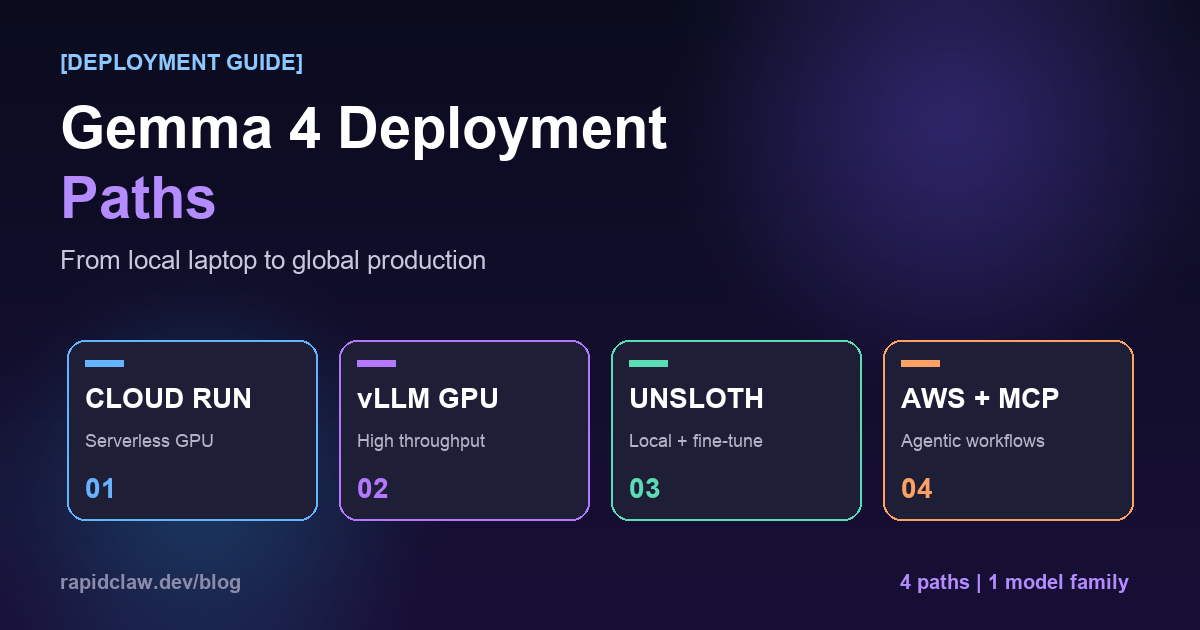
Switching is easy. Picking the right deployment path for your workload is where most teams stall. There are four production-grade routes to run Gemma 4, each tuned for a different mix of cost, scale, and operational overhead. Below is the no-fluff version — what it is, when to pick it, and what you'll actually type.
Option A
Cloud Run (Serverless GPU)
Zero ops, scale-to-zero, pay per second.
Option B
GPU Cloud + vLLM
Maximum throughput for always-on agents.
Option C
Local Deployment (Unsloth)
Zero recurring cost, perfect for R&D and fine-tuning.
Option D
AWS + MCP Agentic Stack
Enterprise-ready agents with tool use over MCP.
Option A — Cloud Run Deployment [Easiest Path]
Google Cloud Run now supports L4 and H100 GPU instances with per-second billing and true scale-to-zero. For teams that need a hosted Gemma 4 endpoint but don't want to babysit a GPU box, this is the fastest path to production.
Best for: bursty agentic workloads, internal tools, side-projects, teams without a dedicated ops person.
[TERMINAL — CLOUD RUN DEPLOY]
# Deploy Gemma 4 E4B to Cloud Run with an L4 GPU
gcloud beta run deploy gemma4-inference \
  --image=us-docker.pkg.dev/google-samples/containers/gke/gemma4-vllm:latest \
  --region=us-central1 \
  --gpu=1 --gpu-type=nvidia-l4 \
  --cpu=8 --memory=32Gi \
  --max-instances=10 --min-instances=0 \
  --set-env-vars="MODEL_ID=google/gemma-4-e4b-it,MAX_MODEL_LEN=131072" \
  --no-cpu-throttling --allow-unauthenticated
Cold starts land around 25–40 seconds for E4B and under 90 seconds for the 26B MoE. Warm request latency is identical to an always-on box. At min-instances=0, a lightly-used workload costs under $50/mo — you pay only for seconds actively serving requests.
Option B — GPU Cloud + vLLM [Best Throughput]
For sustained agentic traffic — think a production support bot or a code-review pipeline hitting thousands of requests per hour — vLLM on a rented A100/H100 crushes everything else on tokens-per-dollar. PagedAttention and continuous batching let a single H100 serve 150–400 concurrent Gemma 4 31B requests.
Best for: high-QPS production agents, multi-tenant inference APIs, anyone replacing a $5K/mo Claude API bill with a $900/mo box.
[TERMINAL — vLLM SERVER]
# Spin up vLLM with the OpenAI-compatible server
pip install vllm==0.7.0

python -m vllm.entrypoints.openai.api_server \
  --model google/gemma-4-31b-it \
  --tensor-parallel-size 2 \
  --max-model-len 262144 \
  --gpu-memory-utilization 0.92 \
  --enable-auto-tool-choice \
  --tool-call-parser gemma4 \
  --port 8000

# From your app, point any OpenAI client at http://<host>:8000/v1
# Function calling, streaming, and 256K context all work out of the box.
On a RunPod H100 PCIe (roughly $2.20/hr) you'll see 8–12K output tokens/sec aggregate with batching on. A 24/7 deployment lands near $1,600/mo — still a fraction of equivalent Claude API spend, and you own the box.
Option C — Local Deployment with Unsloth [$0/mo]
Unsloth gives you 4-bit quantized Gemma 4 31B running on a single RTX 4090 with near-zero quality loss and ~2x faster inference than vanilla transformers. For solo devs, agencies, and teams prototyping before production, this is the path.
Best for: privacy-critical work (nothing leaves your LAN), fine-tuning experiments, founders who already own a gaming GPU.
[TERMINAL — UNSLOTH LOCAL]
# One-line install, then load the 4-bit quantized 31B
pip install unsloth

from unsloth import FastLanguageModel
model, tokenizer = FastLanguageModel.from_pretrained(
    model_name="unsloth/gemma-4-31b-it-bnb-4bit",
    max_seq_length=262144,
    load_in_4bit=True,
    dtype=None,
)

# Serve it via llama.cpp / Ollama / LM Studio — all supported
# GGUF export:
model.save_pretrained_gguf("gemma4-31b-q4", tokenizer, quantization_method="q4_k_m")
Unsloth also ships a 2x faster LoRA fine-tuning path — train Gemma 4 on your internal docs for a few dollars of electricity. The resulting adapter is ~200MB and hot-swappable at inference time.
Option D — AWS + MCP Agentic Workflows [Most Flexible]
If your agent needs to do things — query internal databases, call partner APIs, touch S3, hit Slack — then you want the Model Context Protocol (MCP) in front of a self-hosted Gemma 4 deployment. AWS SageMaker + Bedrock-compatible endpoints + an MCP gateway is the enterprise template.
Best for: teams already on AWS, anything touching PII or SOC 2 scope, workflows that bridge 3+ internal systems.
[TERMINAL — AWS + MCP STACK]
# 1. Deploy Gemma 4 31B to a SageMaker g6e.12xlarge endpoint
aws sagemaker create-model --model-name gemma4-31b-prod \
  --primary-container Image=<vllm-inference-image>,ModelDataUrl=s3://<bucket>/gemma4/

# 2. Register MCP tools (stdio or HTTP) that the agent can call
# mcp-server-aws, mcp-server-postgres, mcp-server-slack, etc.

# 3. Route from your app via an MCP-aware client:
from mcp import ClientSession
async with ClientSession(transport="http://gateway:9000") as session:
    tools = await session.list_tools()            # discover tools
    result = await session.call_tool(
        "sql.query", {"statement": "SELECT COUNT(*) FROM orders"}
    )
The payoff: Gemma 4's native 6 function-calling tokens hand off cleanly to MCP tool invocations, and every tool call is audit-logged at the gateway. You get the agentic power of Claude with the cost profile of an open model and the compliance posture of your own VPC.
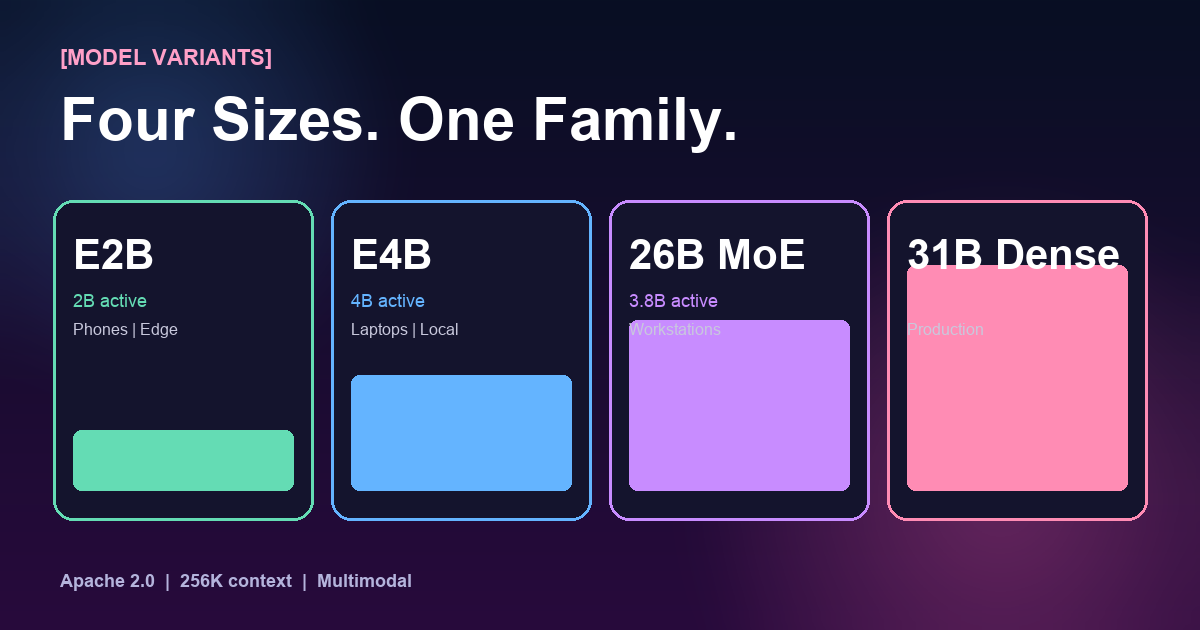
Picking the Right Variant [E2B · E4B · 26B MoE · 31B Dense]
The four-model lineup isn't marketing — it's a real deployment decision. Here's how to choose:
Edge & mobile — 2B active parameters
Runs on phones, Raspberry Pi, and in-browser via WebGPU. Pick this when latency matters more than peak capability — voice assistants, offline dictation, local summarization. 128K context, ~90 tok/s on an iPhone 16 Pro.
Laptop-class — 4B active parameters
The sweet spot for developer laptops. Runs comfortably on an M3 MacBook Pro or any 8GB GPU. Strong enough to replace GPT-3.5-class workloads. 128K context, native tool use, ideal for local coding agents.
Efficient production — 3.8B active of 26B
Mixture-of-experts: the quality of a 26B model at the inference cost of a 4B. Fits in 24GB VRAM. This is the default pick for mid-scale production — 95% of 31B Dense quality at 40% of the compute.
Peak open-model quality — 31B parameters
#3 globally among open models on Arena AI. Codeforces ELO 2,150. This is what you deploy when you're directly competing with Claude or GPT-4 on reasoning quality. Needs 48–80GB VRAM unquantized, 24GB at Q4.
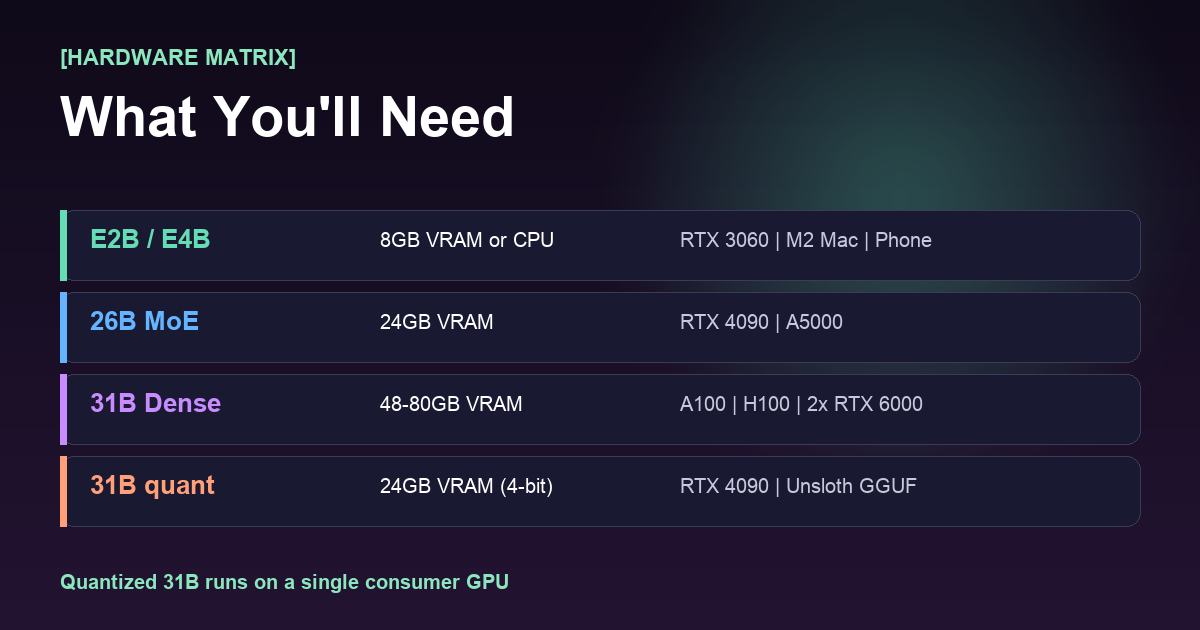
Hardware Requirements [Per Model]
| Variant | Min VRAM | Recommended GPU | Throughput (tok/s) |
|---|---|---|---|
| E2B (FP16) | 6 GB | RTX 3060 · Apple M-series · phones | 140–220 |
| E4B (FP16) | 10 GB | RTX 3090 · RTX 4070 · M3 Pro | 90–150 |
| 26B MoE (FP16) | 24 GB | RTX 4090 · A5000 · L40S | 70–120 |
| 31B Dense (FP16) | 64–80 GB | A100 80G · H100 · 2× RTX 6000 Ada | 45–85 |
| 31B Dense (Q4) | 24 GB | RTX 4090 · Unsloth GGUF | 35–60 |
The quiet headline: Unsloth's 4-bit quantization of 31B Dense runs on a single $1,600 consumer GPU. Two years ago a model of this class would have required an 8×A100 node.
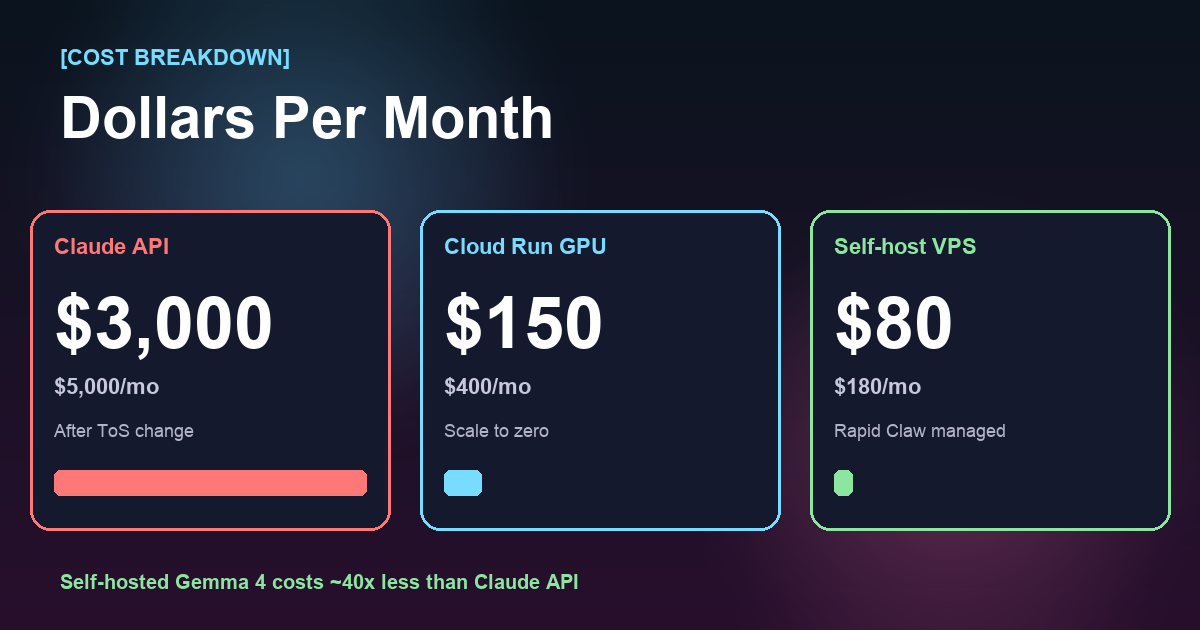
Full Cost Breakdown [Monthly]
Assume a typical agentic workload: ~20M input tokens and ~4M output tokens per month, mixed 256K-context tool-use sessions. Here's what each path actually costs once all-in:
| Deployment | Base compute | Egress + storage | All-in / mo |
|---|---|---|---|
| Claude API (post-ToS) | $3,200 | $0 | $3,000–5,000 |
| Cloud Run L4 (E4B) | $110 | $25 | $150–400 |
| vLLM on H100 (31B) | $1,450 | $40 | $1,500–1,800 |
| Self-host VPS (26B MoE) | $120 | $20 | $140–220 |
| Unsloth local (own GPU) | $0 | ~$25 power | $25–60 |
The spread is ~40× between Claude API and a self-hosted 26B MoE VPS — before factoring in rate limits, outages, or the next ToS change. A single engineer's salary can't justify that delta.
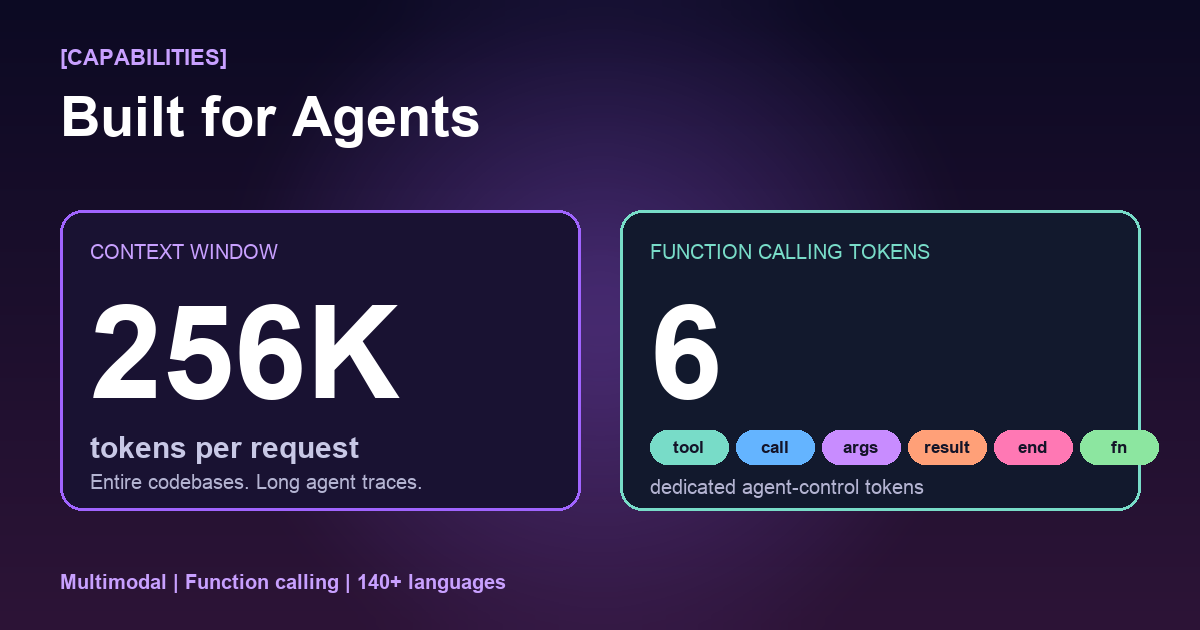
What Makes Gemma 4 Actually Agent-Ready [256K · 6 Tokens]
Two under-discussed details matter more than the leaderboard scores once you're shipping real agents:
[FEATURE]
256K context window
Fit an entire mid-size codebase, a year of Slack threads, or 400 pages of docs in a single prompt. Gemma 4's 26B MoE and 31B Dense both ship with native 256K — no sliding-window hacks, no RAG gymnastics for medium-length jobs.
Real impact: agentic traces that used to require aggressive summarization now stream end-to-end. You see the full tool-use chain, every file read, every reasoning step.
[FEATURE]
6 function-calling tokens
Gemma 4 reserves six special tokens — <tool_call>, <tool_args>, <tool_result>, <tool_end>, <fn>, and </fn> — dedicated to agent control flow.
Real impact: tool calls are unambiguous at the tokenizer level. No regex parsing of JSON-in-markdown. vLLM, llama.cpp, and the MCP gateway all parse these directly — fewer failures, easier debugging.
[SAMPLE — GEMMA 4 TOOL CALL]
<fn>
  <tool_call>search_docs</tool_call>
  <tool_args>{"query": "rate limits", "top_k": 5}</tool_args>
</fn>

# Host parses, calls the MCP tool, streams back:

<fn>
  <tool_result>{"matches": [...]}</tool_result>
  <tool_end/>
</fn>
That's the full protocol. Paired with MCP, this is how Gemma 4 reaches into your systems without the fragile prompt-engineering scaffolding that older open models required.
The Bottom Line
Anthropic's ToS change isn't surprising—it's inevitable. Every proprietary AI provider will eventually optimize for their own margins over your workflow. The question isn't whether this will happen again (it will), but whether you'll be prepared when it does.
Gemma 4 proves that open models have crossed the threshold where self-hosting isn't a compromise—it's a competitive advantage. Pair that with a managed hosting platform like Rapid Claw, and you get the best of both worlds: production-grade infrastructure without the vendor lock-in.
The teams that move to self-hosted AI infrastructure this week will look back at this moment as the turning point. Don't be the ones still scrambling when the next ToS update drops.
Ready to Own Your AI Infrastructure?
Get a managed VPS with OpenClaw, smart model routing, and your choice of open models. Set up takes under 2 minutes.
Related Reading
Self-Host vs Managed OpenClaw: Cost Breakdown
Real numbers on hosting your own AI agents
AI Agent Token Costs: $100K/Year Problem
Why smart routing saves teams thousands
Smart Routing: Cut Token Costs 60%+
Route to the right model for each task
GPU Costs for AI Agents in 2026
Infrastructure pricing breakdown
Shipping Claude Agent SDK to Production
If you stay on Anthropic, here’s the production-grade SDK playbook
Multi-Model Agent Collaboration
Mix Claude, GPT, Gemini, and self-hosted Gemma in one agent stack