February 19, 2026·16 min read
The Complete Beginner's Guide to AI Agents: What They Are, How They Work, and How to Get One
You have heard the buzzword. Everyone is talking about "AI agents." But what actually are they? How are they different from ChatGPT? And most importantly — should you care? This guide explains everything in plain English, with zero jargon and zero assumptions about your technical background.
An AI agent is software that can independently complete tasks on a computer. Unlike chatbots that only generate text, AI agents can see screens, click buttons, type text, browse the web, and run workflows 24/7—just like a human assistant sitting at a computer.
TL;DR
AI agents are software that independently complete tasks on computers by seeing screens and controlling applications—unlike chatbots that only generate text. OpenClaw is the leading open-source AI agent, and you can get started at $29/month.
1. What Is an AI Agent?
An AI agent is software that can independently complete tasks on your behalf. Unlike a chatbot that waits for you to ask a question and then gives you a text answer, an agent can take action in the real world — browse websites, click buttons, fill out forms, send emails, manage files, and operate applications.
Think of the difference like this:
A chatbot is like a very smart friend you text for advice. They can suggest what to do, but you still have to do it yourself.
An AI agent is like a personal assistant who sits at a computer and does the work for you. You say what needs to happen, and they make it happen.
2. AI Chatbot vs. AI Agent: The Key Difference
This is the single most important distinction to understand. We wrote a detailed comparison between OpenClaw, ChatGPT, and Claude, but here is the summary:
AI Chatbots
(ChatGPT, Claude, Gemini)
- - Answer questions
- - Generate text and code
- - Analyze documents
- - Work inside a chat window only
- - Stop when you close the tab
AI Agents
(OpenClaw, etc.)
- + Everything chatbots do, plus:
- + See and control a computer screen
- + Browse the web autonomously
- + Use any desktop application
- + Run 24/7 in the background
3. What Can AI Agents Actually Do?
The short answer: anything a human can do on a computer. Here are some real examples of what people are using OpenClaw for right now:
For Professionals
Email triage, calendar management, automated morning briefings, meeting prep, expense reports, data entry, CRM updates
For Developers
Code reviews, bug triage, CI/CD monitoring, documentation generation, dependency updates, incident response
For Creators
Video repurposing, thumbnail generation, social media scheduling, newsletter research, UGC production
For Small Business Owners
Inventory management, bookkeeping, customer service, competitive research, marketing automation
For more inspiration, check out our top 10 automation ideas.
4. What Is OpenClaw?
OpenClaw is the leading open-source AI agent. It was created by the community and is free for anyone to use, modify, and extend. It works by:
- Seeing — taking screenshots of a computer screen to understand what is displayed
- Thinking — sending those screenshots to a large language model (like GPT-5 or Claude) to decide what to do next
- Acting — moving the mouse, clicking buttons, and typing text to complete the task
- Repeating — taking a new screenshot to verify the result and decide the next step
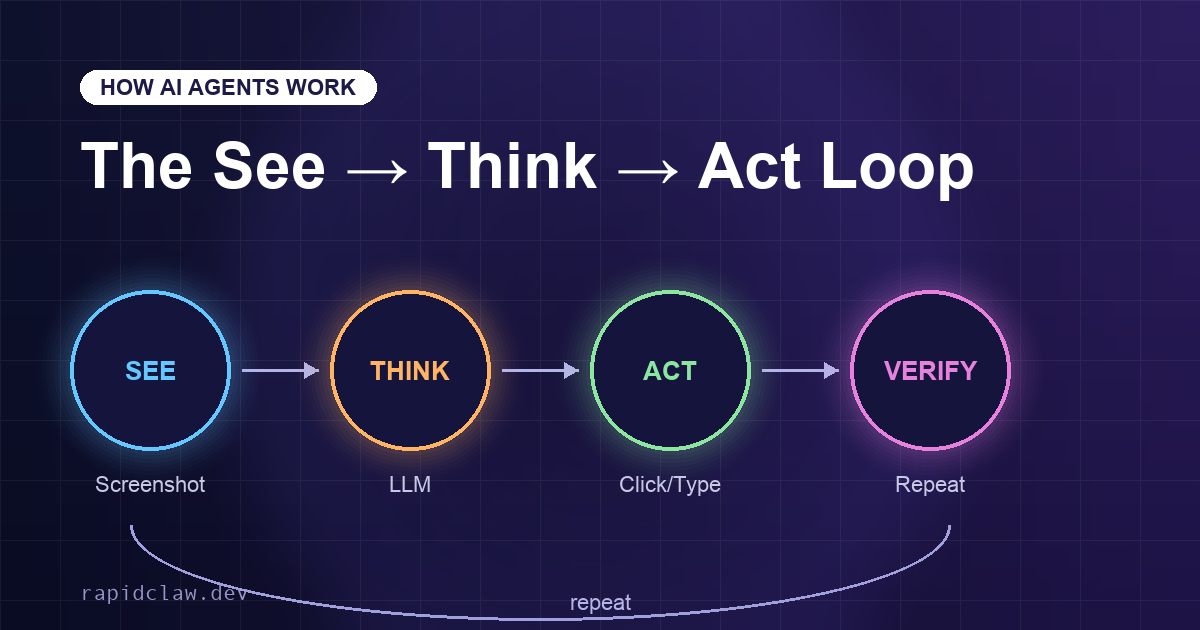
This see-think-act loop is what makes OpenClaw so powerful. It can use any application that has a visual interface — no special APIs or integrations required. If you can see it on a screen, OpenClaw can interact with it. To get the best results, you will want to learn how to write effective instructions — our prompt engineering guide for OpenClaw walks through the techniques.
Why the see-think-act loop matters
Because OpenClaw interacts with pixels instead of APIs, it works with any software — legacy apps, websites without APIs, internal tools, even desktop-only programs. That universality is what makes AI agents a genuine step beyond chatbots.
Ready to try your first AI agent?
Rapid Claw gives you a fully configured OpenClaw instance in under 3 minutes. No technical setup, no server management, no command line. Just describe what you want automated and your agent handles the rest.
Try Rapid Claw — 5 free msgs, then $29/m5. How to Get Your Own AI Agent
You have two options:
Option A: Self-Host (Technical)
Download OpenClaw from GitHub and set it up on your own server. This requires Linux knowledge, Docker, a cloud VPS, and ongoing maintenance. Good if you are a developer who wants full control. Read our 24/7 setup guide for details.
Time to set up: 4-8 hours
Option B: Use Rapid Claw (Recommended)
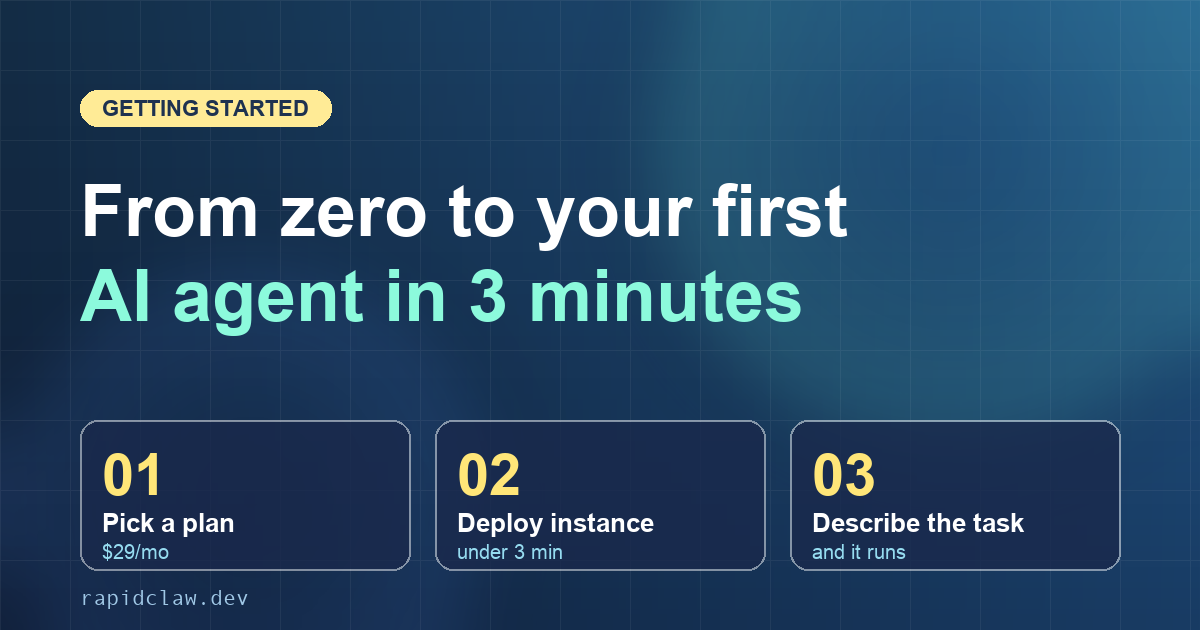
Rapid Claw is managed hosting for OpenClaw. We handle all the server setup, security, updates, and maintenance. You just pick a plan, and your dedicated AI agent is running in minutes. Read the getting started guide for a walkthrough, the full documentation for feature reference, and the production deployment checklist before going live.
Time to set up: Under 3 minutes
6. Is It Safe?
This is the most common question, and it deserves a thorough answer. We wrote a full article on whether giving AI computer access is safe, but the short version: yes, when set up correctly.
The key is isolation. When you use Rapid Claw, your AI agent runs on a completely separate cloud server. It never touches your personal computer. If something goes wrong, the blast radius is limited to that isolated environment — and daily backups mean you can restore to a previous state in one click.
The one rule: never run an agent on your personal computer
Isolation is not optional — it is the single most important safety principle for AI agents. Rapid Claw handles this by default: every instance runs in a sandboxed cloud environment with daily backups, TLS 1.3 encryption, and 24/7 monitoring.
For specific security tips, read our security best practices guide.
7. What Does It Cost?
OpenClaw itself is free and open source. If you self-host, your costs are the cloud server (typically $20-50/month for a decent VPS) plus the AI model API costs (varies by usage).
With Rapid Claw, everything is bundled into simple plans:
Every plan includes your own dedicated cloud instance, 24/7 uptime, automatic updates, daily backups, and smart model routing that automatically picks the cheapest AI model capable of handling each task — saving you up to 60% on AI costs. Not sure which plan fits your usage? The AI agent cost calculator lets you estimate monthly costs before you commit.
Jargon Buster: Terms You Will Hear
AI Agent
Software that can independently complete tasks on a computer, going beyond just answering questions.
LLM (Large Language Model)
The AI brain behind agents and chatbots. Examples: GPT-5, Claude, Gemini.
Computer Use / Screen Control
The ability to see a screen and interact with it using mouse and keyboard — what makes agents different from chatbots.
Open Source
Software whose code is publicly available for anyone to inspect, use, and modify. OpenClaw is open source.
Managed Hosting
A service that runs and maintains software for you, so you do not need technical skills. Rapid Claw is managed hosting for OpenClaw.
Instance
Your own dedicated copy of the software running on a server. Each Rapid Claw customer gets their own isolated instance.
Token
The unit AI models use to measure usage. Roughly 1 token = 1 word. Your plan includes a set amount of tokens per month.
Ready to Meet Your AI Agent?
You do not need to be technical. You do not need to understand code. Rapid Claw makes it as easy as signing up for any other online service. Pick a plan, describe what you want automated, and let your AI agent get to work.