AI Agent Hosting: The Complete Guide to Deploying Agents in Production
Everything you need to know about running AI agents in production — from architecture and security to cost optimization and common pitfalls. Updated for 2026.
April 11, 2026·25 min read
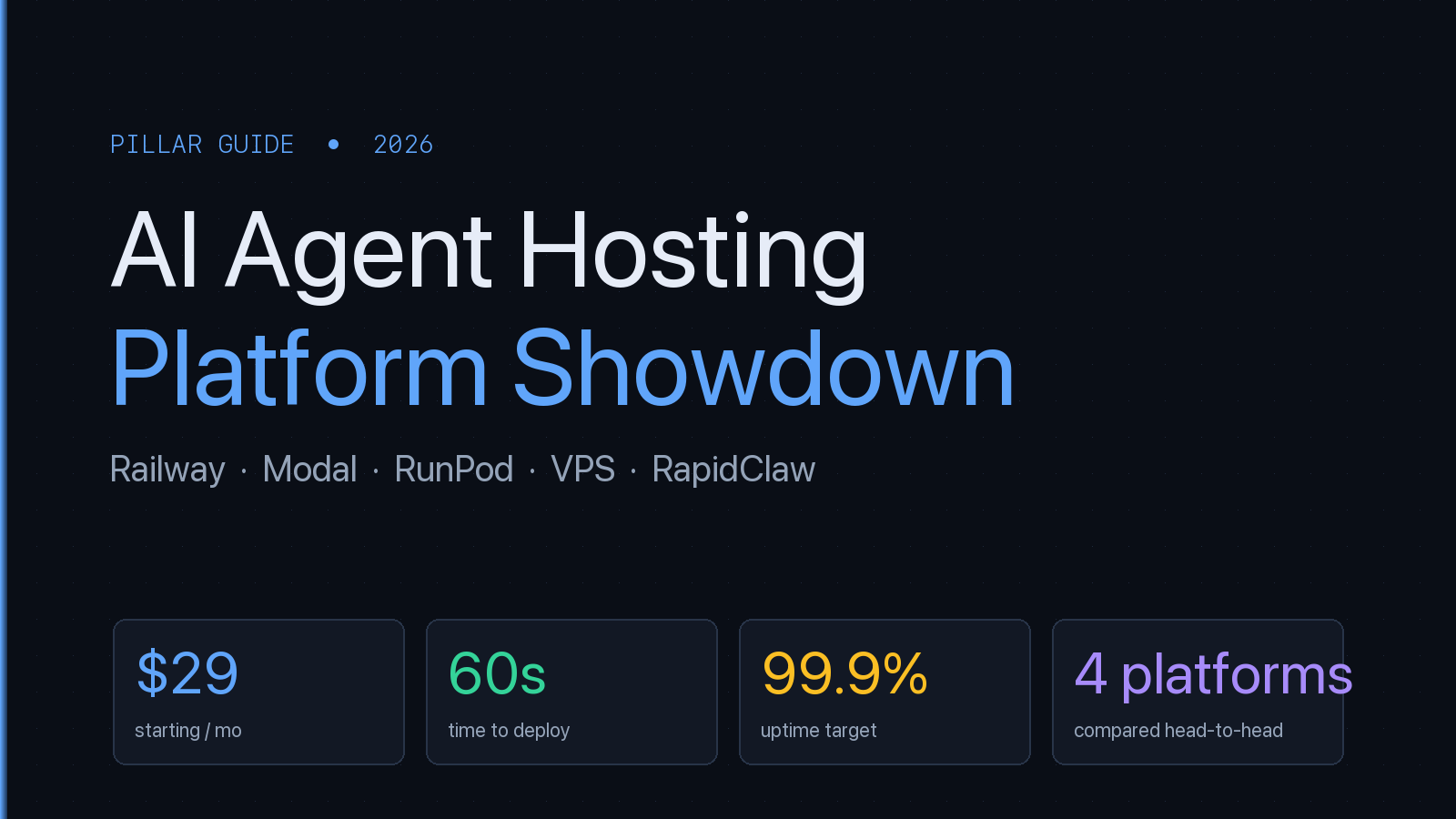
$29
Starting price/mo
60s
Deploy time
99.9%
Uptime target
What's in this guide
- 01What Is AI Agent Hosting?
- 02Types of AI Agent Hosting
- 03How to Choose a Hosting Platform
- 04Production Architecture for AI Agents
- 05Cost Breakdown: Self-Hosted vs Managed
- 06Head-to-Head: Railway vs Modal vs RunPod vs VPS
- 07Pricing Tiers Side-by-Side
- 08GPU Availability & Cold Start Latency
- 09Pros/Cons Matrix for AI Agent Workloads
- 10When to Use Which Platform
- 11Cost per Inference: Real Numbers
- 12RapidClaw’s Dedicated VPS Approach
- 13Security Best Practices
- 14Performance Optimization
- 15Common Pitfalls and How to Avoid Them
- 16Framework Comparison: OpenClaw vs Hermes vs Others
- 17FAQ
1. What Is AI Agent Hosting?
AI agent hosting is the infrastructure layer that keeps autonomous AI agents running in production. It's not just “a server with an API key.” Agents are fundamentally different from traditional web applications — they maintain state across conversations, execute multi-step tool chains, make autonomous decisions, and run background tasks without user input.
Traditional hosting gives you a web server that responds to HTTP requests. Agent hosting gives you a persistent runtime that can hold memory, invoke external tools, manage long-running workflows, and restart gracefully when things go wrong. The infrastructure requirements look more like hosting a database than hosting a website.
At its core, an AI agent hosting platform needs to handle five things well:
- 1.Persistent processes — Agents aren't request-response. They need to stay alive between interactions, maintain conversation history, and resume mid-task after restarts.
- 2.Model API management — Routing requests to the right LLM provider, handling rate limits, managing API keys, and failing over when a provider goes down.
- 3.Tool orchestration — Agents call external APIs, read files, query databases, and execute code. The hosting layer needs to sandbox these operations and manage permissions.
- 4.State and memory — Short-term conversation context, long-term knowledge bases, and session state all need durable storage that survives container restarts.
- 5.Isolation and security — Each agent needs its own sandbox. One agent's failure, data breach, or runaway token usage shouldn't affect other agents on the same platform.
If this sounds like more work than dropping a Next.js app on Vercel, it is. That's why the managed hosting category exists — and why it's growing fast in 2026.
2. Types of AI Agent Hosting
There are three main approaches to hosting AI agents, each with different trade-offs in control, cost, and operational complexity.
Self-Hosted on Your Own Infrastructure
You provision servers (cloud VMs, bare metal, or on-prem), install the agent framework, configure networking, set up monitoring, and manage everything yourself. This gives you maximum control: you own the data, choose the hardware, and can customize every layer of the stack.
The cost is operational burden. You're responsible for OS patching, SSL certificates, container orchestration, log aggregation, uptime monitoring, and security hardening. For a team with strong DevOps skills, this is fine. For a solo founder or a team without infrastructure expertise, this is where projects stall. Most of the “I tried to deploy an AI agent and gave up” stories trace back to self-hosting friction.
Typical self-hosted setups use Docker on a $20–50/month VPS (DigitalOcean, Hetzner, AWS Lightsail) for simple single-agent deployments, or Kubernetes on AWS/GCP for multi-agent production systems. For a detailed walkthrough, see our production deployment guide.
Managed Agent Hosting Platforms
Managed platforms handle infrastructure so you can focus on the agent itself. You configure your agent (system prompt, tools, API keys), and the platform handles deployment, scaling, monitoring, security, and uptime. Think of it as “Vercel for AI agents.” The category-level rundown on what an AI agent platform covers — orchestration, deployment, observability, and security as one stack — is a useful companion if you're comparing managed vendors.
Rapid Claw is a managed hosting platform for OpenClaw and Hermes Agent. You sign up, paste your API key, configure your system prompt, and your agent is live in under 60 seconds. Each customer gets an isolated container with AES-256 encryption, automatic SSL, and CVE auto-patching included.
Other platforms in this space include ClawAgora, KiwiClaw, and xCloud — we cover the differences in our comparison page. The key question when evaluating managed platforms is what frameworks they support, whether they offer true container isolation (not just process isolation), and how they handle token cost pass-through.
Hybrid: Self-Hosted Framework, Managed Infrastructure
Some teams run the agent framework themselves but use managed container services (AWS ECS, Google Cloud Run, Railway, Fly.io) instead of managing VMs directly. This gives you more control over the agent configuration than a fully managed platform, while offloading container orchestration and networking.
The trade-off is that you still need to understand containerization, write Dockerfiles, configure health checks, and manage deployments — but you don't need to patch operating systems or manage load balancers. For teams with some engineering capacity but not a full DevOps function, this can be a good middle ground.
3. How to Choose a Hosting Platform
The right hosting approach depends on your team size, technical capacity, security requirements, and how quickly you need to ship. Here's a decision framework:
| Factor | Self-Hosted | Managed |
|---|---|---|
| Time to deploy | Hours to days | Under 60 seconds |
| DevOps required | Yes, ongoing | None |
| Monthly cost (single agent) | $20–100 + tokens | $29 + tokens |
| Security hardening | You build it | Included |
| Infrastructure control | Full | Limited |
| Scaling | Manual | Automatic |
| Best for | Large teams, compliance | Solo founders, small teams |
Our recommendation: Start with managed hosting. Get your agent into production, validate it with real users, and collect usage data. If you outgrow the managed platform's constraints (custom networking, specific compliance requirements, GPU-heavy workloads), migrate to self-hosted with the operational knowledge you've gained. Going the other direction — spending weeks on infrastructure before validating the agent — is how projects die.
For a deeper dive into self-hosted vs managed trade-offs specific to OpenClaw, see OpenClaw Hosting Cost: Self-Host vs Managed.
4. Production Architecture for AI Agents
A production AI agent deployment has more moving parts than most teams expect. Here's the architecture you'll end up with, whether you build it yourself or get it from a managed platform.
The Core Stack
Every production agent deployment needs these components:
- •Agent runtime — The framework process itself (OpenClaw, Hermes Agent, LangGraph, etc.). Runs as a long-lived process or containerized service.
- •Reverse proxy / API gateway — Handles TLS termination, rate limiting, authentication, and routing. Nginx, Caddy, or a managed API gateway.
- •Persistent storage — For conversation history, agent memory, file uploads, and configuration. PostgreSQL or SQLite for structured data; S3-compatible object storage for files.
- •Model router — Directs LLM API calls to the appropriate provider, handles failover when a provider is down, and tracks token usage for billing.
- •Monitoring and alerting — Health checks, error rates, token usage dashboards, and alerts for anomalous behavior. Without this, you're flying blind.
Container Isolation
This is the single most important architectural decision. Each agent should run in its own isolated container. Not just a separate process — a separate filesystem, network namespace, and resource quota. This prevents one agent's crash or security breach from affecting others, and it makes resource accounting straightforward.
On Rapid Claw, every customer gets a dedicated Docker container with capped CPU and memory. There's no shared state between containers, and no way for one agent to access another agent's data. This is the baseline for production-grade agent hosting. If a platform can't tell you exactly how agents are isolated, that's a red flag.
Memory Architecture
Agents need multiple memory layers, and getting this right is critical for production quality:
- •Context window — The current conversation, tool results, and system prompt. This is what the model sees on each turn. Limited by the model's context length (100K–200K tokens for current Claude models).
- •Session memory — Conversation history that persists across page reloads but not across sessions. Typically stored in-memory or in Redis.
- •Long-term memory — Knowledge the agent retains permanently: user preferences, project context, learned procedures. Stored in a database, often with vector embeddings for retrieval.
For a detailed deep dive on agent memory systems, see our guide on AI Agent Memory and State Management.
Want to skip the infrastructure and deploy now?
Start free — 5 msgs, then $29/m5. Cost Breakdown: Self-Hosted vs Managed
Cost is the question everyone asks first, but the answer depends entirely on your usage pattern and what you count as “cost.” Here's an honest breakdown.
Token Costs (The Big One)
Token costs dominate every AI agent budget. A single agent conversation uses 2,000–10,000 tokens per turn (input + output). At Claude Sonnet's pricing ($3/M input, $15/M output), that's $0.01–0.05 per conversation turn. Scale to 100 conversations/day and you're looking at $30–150/month just in tokens — before any infrastructure costs.
Heavy agents with large context windows, frequent tool calls, and long multi-step workflows can easily hit $100K+/year in token costs. Our deep dive on why AI agent token costs can reach $100K/year breaks this down with real numbers. Smart routing — automatically selecting the cheapest model that can handle each request — can cut token costs 30–60%. See how smart routing reduces costs.
Infrastructure Costs
| Component | Self-Hosted | Rapid Claw |
|---|---|---|
| Compute | $20–50/mo (VPS) | Included |
| SSL / domain | Free–$15/mo | Included |
| Monitoring | $0–30/mo | Included |
| Database | $0–20/mo | Included |
| Security patching | Your time | Automatic |
| DevOps time | 4–10 hrs/mo | 0 hrs |
| Total (excl. tokens) | $40–150/mo + time | $29/mo |
The hidden cost of self-hosting is time. If your hourly rate is $100 and you spend 8 hours/month on DevOps, that's $800/month in opportunity cost — 27x the price of managed hosting. Use our AI Agent Cost Calculator to model your specific scenario.
For GPU-intensive workloads (running local models, fine-tuning, embedding generation), see our analysis of GPU costs for AI agents in 2026.
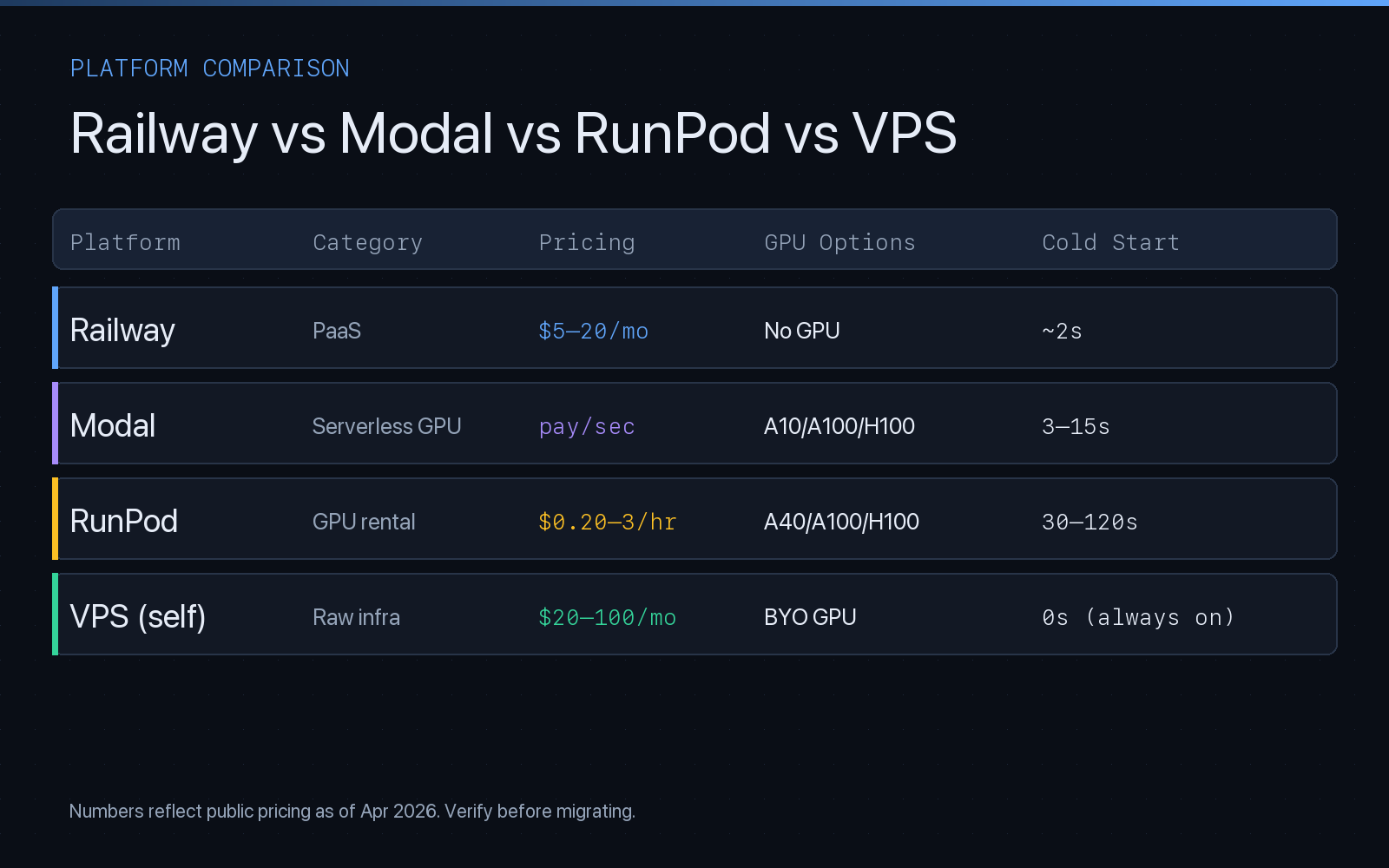
6. Head-to-Head: Railway vs Modal vs RunPod vs VPS
When teams evaluate where to run AI agents, four names come up the most: Railway (PaaS for always-on services), Modal (serverless GPU functions), RunPod (on-demand GPU rental), and a dedicated VPS on DigitalOcean, Hetzner, or AWS Lightsail. Each was built for a different workload, and that shows up fast when you run an AI agent on it.
Railway
Railway is a polished PaaS for deploying long-running services from a Git repo or Dockerfile. For an AI agent that only calls hosted LLM APIs (Anthropic, OpenAI), Railway is one of the fastest ways to get to production. No GPU, but you don't need one if the model runs in someone else's cloud. Services sleep on idle in cheaper plans, which hurts agents that poll or run background tasks — upgrade to a plan that keeps them warm.
Modal
Modal is serverless-first with excellent GPU support (A10, A100, H100). You write Python functions decorated with @app.function and Modal snapshots the container, routes requests to warm replicas, and bills per second. For agents that need GPU inference on open-weight models (embeddings, local LLMs, vision), Modal's per-second pricing is much cheaper than renting a GPU 24/7. The downside is cold starts: a fresh container with a large model image is 3–15 seconds before first token. Fine for batch jobs, painful for interactive chat.
RunPod
RunPod rents bare GPUs by the hour or second. The Secure Cloud tier is reliable, the Community Cloud tier is 40–60% cheaper but shares hardware with untrusted tenants. Serverless endpoints have long cold starts (30–120s while the container pulls and the GPU warms). Pods (always-on VMs with a GPU attached) have no cold start but bill 24/7 whether your agent is busy or idle.
Dedicated VPS
A plain VPS — DigitalOcean Droplet, Hetzner CX32, AWS Lightsail, Linode — is the oldest and most predictable option. You get a fixed monthly price, full root access, and zero cold start because the agent process is always resident in memory. No GPU unless you pay for a GPU-attached instance (usually 5–20× the price of a CPU-only box). For AI agents that orchestrate hosted-LLM API calls, a $20–50/month VPS is genuinely enough — if you don't mind owning the Dockerfile, systemd unit, Nginx config, and patch schedule.
7. Pricing Tiers Side-by-Side
Published pricing as of April 2026. These are baseline compute costs for a single small-to-medium AI agent — add token spend on top.
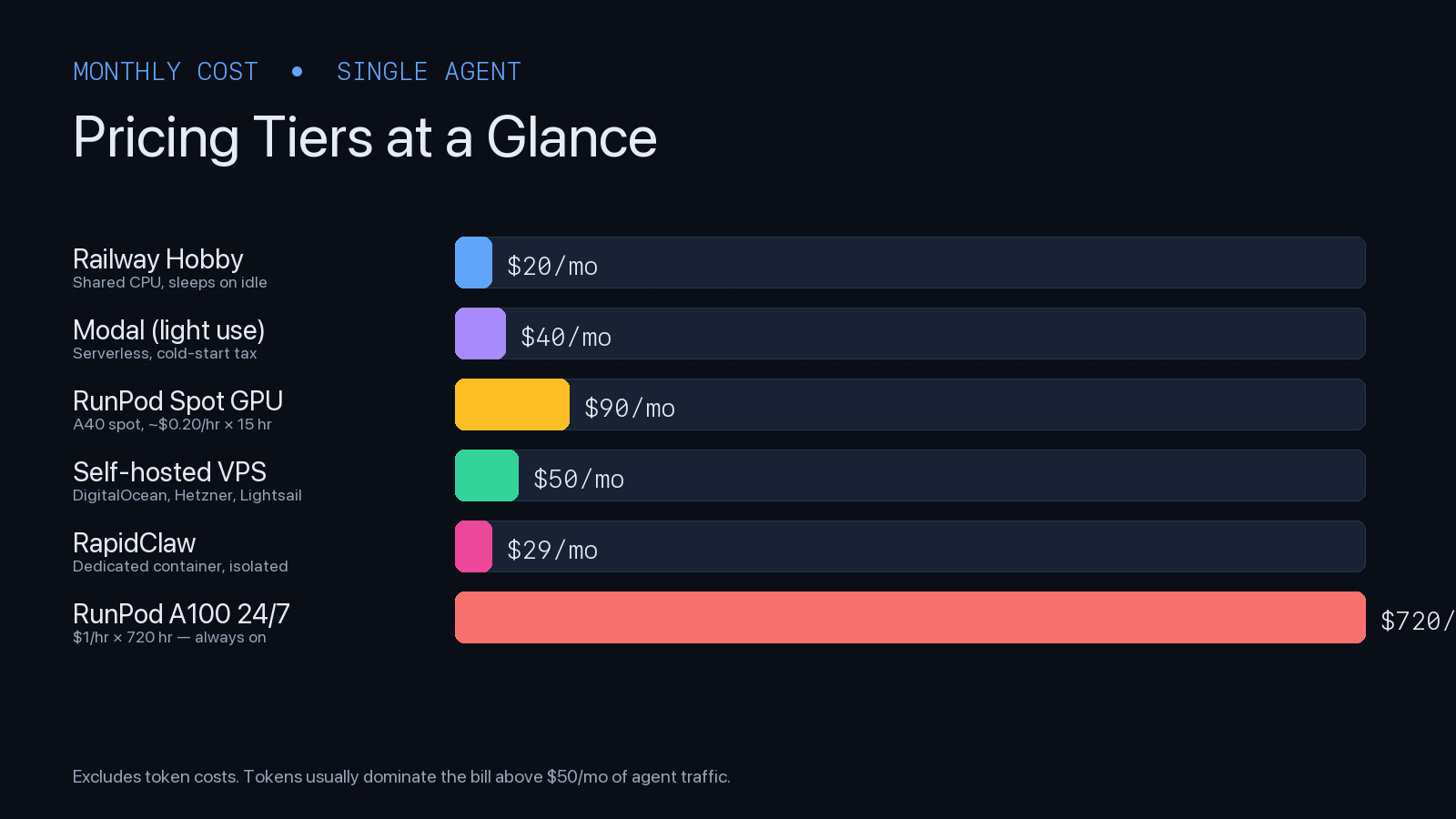
| Tier | Starting price | What you get |
|---|---|---|
| Railway Hobby | $5/mo + usage | Shared CPU, $5 credit, sleeps on idle |
| Railway Pro | $20/mo + usage | Always-on services, priority support |
| Modal (serverless) | pay per second | $0.000164/CPU-s; A10 ~$0.000306/s; H100 ~$0.00166/s |
| RunPod Community A40 | $0.20–0.40/hr | Shared-tenant GPU, cheapest on-demand |
| RunPod Secure A100 80GB | ~$1.99/hr | Dedicated hardware, enterprise-grade |
| DigitalOcean Droplet (2GB) | $12/mo | 1 vCPU, 2GB RAM, 50GB SSD |
| Hetzner CX32 | €5.50/mo | 4 vCPU, 8GB RAM — best $/perf in EU |
| Rapid Claw | $29/mo flat | Dedicated container, all infra + security included |
Modal's per-second model rewards bursty traffic: an agent handling 100 inferences/day on an A10 might cost $3–8/month. The same agent on RunPod-always-on would burn $100+/month. The same agent on a CPU-only VPS, calling Claude via API, costs $12–50/month — compute is rarely the bottleneck when the model lives elsewhere.
8. GPU Availability & Cold Start Latency
Cold start is the silent killer of agent UX. A user sends a message, waits 30 seconds while the container pulls and the GPU warms, then the agent finally starts thinking. Nobody wants that. Here's how each platform handles it.
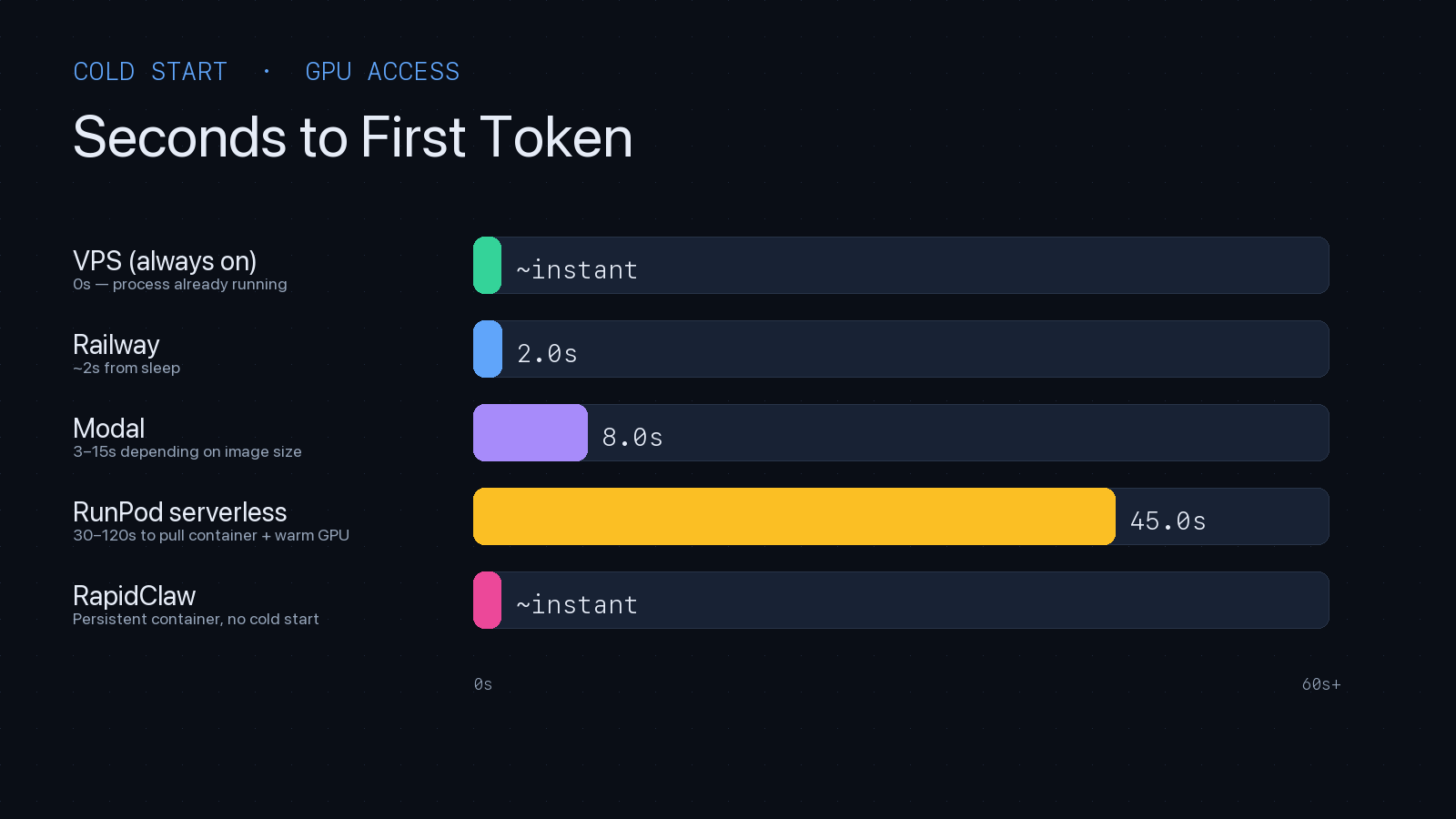
| Platform | GPU availability | Cold start | Always-warm option |
|---|---|---|---|
| Railway | None (CPU only) | ~2s from idle | Pro plan ($20/mo) |
| Modal | A10, A100, H100 (plentiful) | 3–15s | keep_warm=N (billed per second) |
| RunPod serverless | A40, A100, H100 (regional waits) | 30–120s | Active workers (billed 24/7) |
| RunPod pods | Same, reserved | 0s (always on) | Default (billed 24/7) |
| Dedicated VPS | BYO (GPU VPS is expensive) | 0s | Default (billed 24/7) |
| Rapid Claw | N/A (hosted-LLM model) | 0s | Default (flat $29/mo) |
GPU availability has its own gotcha: H100s are often waitlisted in popular regions. If you're building on RunPod or Modal for H100 inference, pick a region early and confirm capacity before demo day. For hosted-LLM agents (Claude, GPT-5), GPU availability on your hosting platform is irrelevant — the GPU lives in Anthropic's or OpenAI's data center.
9. Pros/Cons Matrix for AI Agent Workloads
Railway
Pros
- • Git-push deploys, great DX
- • Managed Postgres + Redis in one dashboard
- • Predictable billing for always-on services
Cons
- • No GPU — hosted-LLM agents only
- • Hobby plan sleeps on idle
- • No agent-specific tooling (memory, routing)
Modal
Pros
- • Per-second GPU billing — cheapest bursty inference
- • Strong Python-native DX with decorators
- • Container snapshots & fast scaling
Cons
- • 3–15s cold starts break chat UX
- • Python-only — no Node/Go agents
- • Stateful agents need external Redis/DB
RunPod
Pros
- • Cheapest raw GPU rental (esp. Community Cloud)
- • A100/H100 availability when others are full
- • Full control over CUDA, drivers, model weights
Cons
- • 30–120s serverless cold starts
- • Community Cloud is shared-tenant (data concerns)
- • You manage everything above the CUDA driver
Dedicated VPS
Pros
- • Zero cold start — always resident
- • Flat predictable price, no surprise bills
- • Full root, full data residency control
Cons
- • You own OS patching, SSL, backups, monitoring
- • GPU VPS is 5–20× the price of CPU-only
- • Vertical-scale ceiling — no autoscaling
10. When to Use Which Platform
No platform is universally best. The right choice depends on where your model runs, how your traffic shapes, and how much operational time you have.
- RailwayHosted-LLM agents (Claude, GPT-5, Gemini) with steady always-on traffic. CPU-only. You want Git-push simplicity and don't need GPU. Good default for MVPs calling external LLM APIs.
- ModalBursty GPU inference on open-weight models, embedding generation, vision workloads, or background batch jobs. Any Python workload where per-second billing beats 24/7 pods. Not ideal for sub-second chat latency.
- RunPodLocal-LLM deployments (Llama, Mistral, Qwen) on A100/H100, fine-tuning runs, heavy vision pipelines, or any workload where you need raw GPU access and will pay 24/7. Use pods for interactive, serverless for batch.
- VPSLow-traffic hosted-LLM agents, long-running orchestration, anything with strict data residency. Cheapest at steady-state if you already have DevOps skills. Hetzner in EU, DigitalOcean in US.
- Rapid ClawOpenClaw or Hermes Agent in production, without owning infrastructure. You want dedicated containers, AES-256, CVE auto-patching, smart routing, and flat pricing. One-click deploy, no Dockerfile.
11. Cost per Inference: Real Numbers
The fairest cost comparison is per-inference, not per-month. Assume a medium agent turn: 4,000 input tokens + 1,000 output tokens, one tool call, ~2 seconds of compute on a CPU or ~1.5 seconds on an A10 GPU for embedding + rerank. Here's what each platform costs for that single turn:
| Platform | Compute cost / turn | @ 10K turns/mo | Notes |
|---|---|---|---|
| Railway Pro | ~$0.0020 | $20 base + ~$0 | Included in flat plan up to quota |
| Modal (A10 warm) | ~$0.00046 | ~$4.60 | 1.5s × $0.000306/s, assumes warm |
| Modal (A10 cold) | ~$0.00275 | ~$27.50 | Adds 8s warm-up at same rate |
| RunPod A40 (pod, 24/7) | ~$0.029 | ~$290 | $0.40/hr ÷ inferences at 10% util |
| Hetzner CX32 VPS | ~$0.0006 | €5.50 base | CPU-only, hosted-LLM agent |
| Rapid Claw | ~$0.0029 | $29 flat | Smart routing cuts token costs 30–60% |
Two takeaways. First, compute is the small line item — token spend at Claude Sonnet 4.6 pricing is ~$0.027/turn ($12 input + $15 output per million tokens), dwarfing every number in the table above. Smart routing matters more than compute selection. Second, GPU pods at low utilization are brutal: if your agent handles 10K turns/month on an A40 pod billed 24/7, you're paying $290 in compute for work a $29 managed platform handles with smart model routing that reduces your token bill by more than $290.
12. Rapid Claw's Dedicated VPS Approach vs These Alternatives
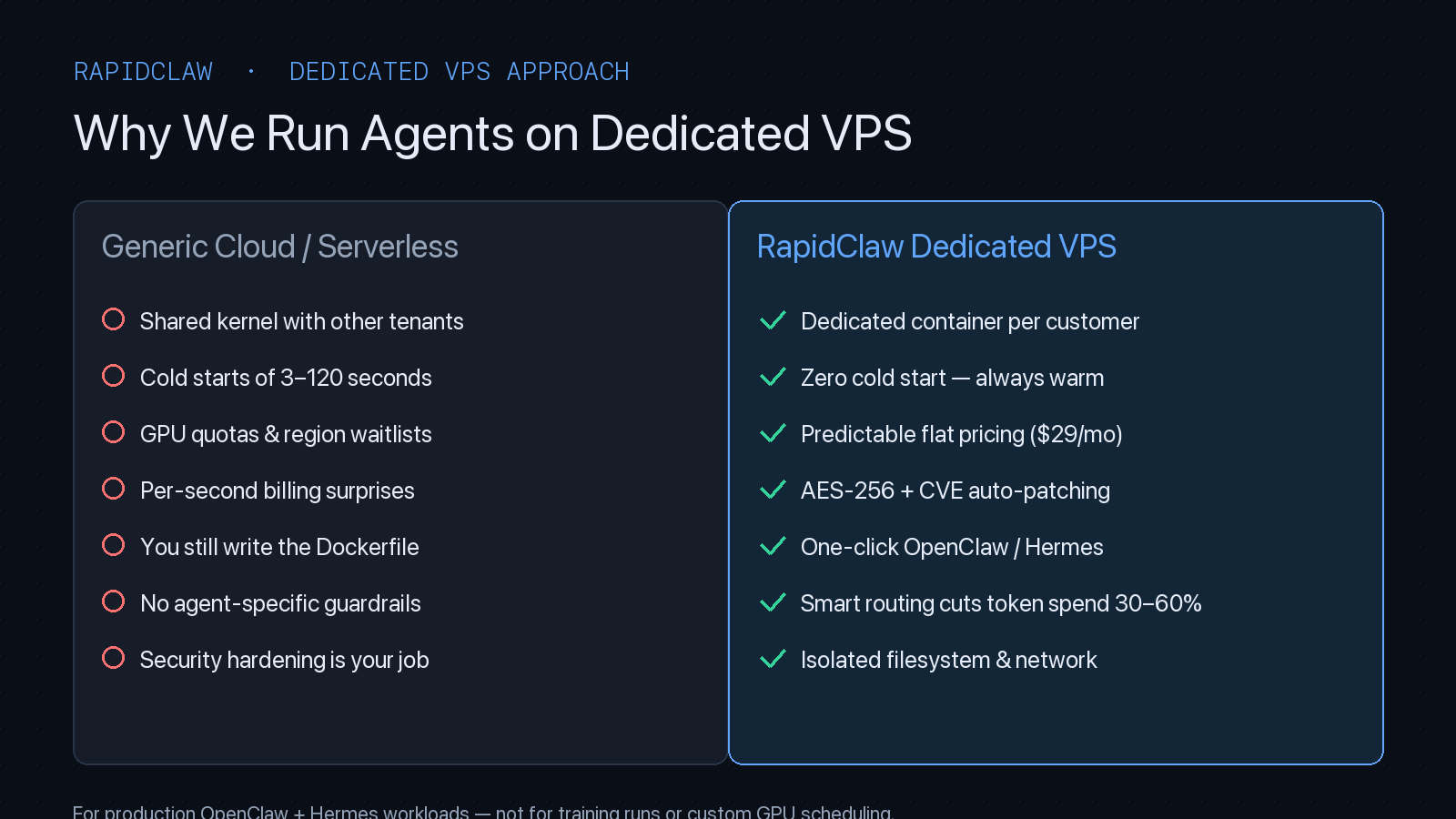
Rapid Claw is not a generic PaaS, a serverless GPU provider, or a rented GPU pod. It's a purpose-built dedicated-VPS layer for OpenClaw and Hermes Agent — every customer gets their own container on a dedicated VPS slice, with agent-specific tooling baked in.
Why a dedicated VPS, not serverless
Serverless is optimized for stateless HTTP functions that scale to zero. AI agents are the opposite: stateful, long-running, and chatty with memory stores and tool APIs. Every cold start is a visible UX regression, every scale-to-zero means a warm memory cache is gone. A dedicated VPS slice per customer gives zero cold start, predictable performance, and a filesystem that survives restarts — without the noisy-neighbor problem of shared PaaS.
Why not raw self-hosted VPS
A raw DigitalOcean droplet is cheaper than Rapid Claw on paper. But by the time you've written the Dockerfile, wired up SSL, installed OpenClaw, configured Nginx, set up CVE patching, added monitoring, rotated API keys, and built your own smart-router — you've spent 20+ hours you won't get back, and you still own the on-call pager. Rapid Claw is that whole stack, pre-built, at $29/month.
Where Rapid Claw isn't the answer
If you need per-second GPU billing for open-weight inference, use Modal. If you're training or fine-tuning, use RunPod. If you need a non-OpenClaw/Hermes framework (LangGraph, CrewAI, AutoGen), self-host on Railway or a VPS. Rapid Claw optimizes hard for the OpenClaw and Hermes production path — not every path.
See our comparison hub for head-to-head breakdowns against ClawAgora, KiwiClaw, and xCloud, or jump straight to pricing.
13. Security Best Practices
AI agents are a new attack surface. They have network access, tool permissions, and access to user data — which means a compromised agent is far more dangerous than a compromised chatbot. Security isn't optional; it's the first thing to get right.
Container Isolation (Non-Negotiable)
Every agent runs in its own container with a dedicated filesystem, network namespace, and resource limits. No shared memory, no shared volumes, no way for Agent A to see Agent B's data. This is the single most important security control for multi-tenant agent hosting. If your hosting provider uses process-level isolation instead of container isolation, you are sharing a kernel and filesystem with other customers.
Encryption
AES-256 for data at rest. TLS 1.3 for data in transit. API keys stored in encrypted vaults, never in environment variables or plaintext configs. Conversation logs encrypted with per-customer keys so that a database compromise doesn't expose all customers' data.
Principle of Least Privilege for Tools
If your agent can read files, it shouldn't also be able to delete them unless that's explicitly required. Every tool permission should be opt-in, not default-on. This applies to API access, file system access, network access, and database permissions. A customer support agent doesn't need write access to the billing database.
Prompt Injection Defense
Agents that process user input are vulnerable to prompt injection: malicious input that tricks the agent into executing unintended actions. Defense strategies include input sanitization, output validation, and separating the instruction layer (system prompt) from the data layer (user input). There's no silver bullet yet, but layered defenses significantly reduce risk.
Audit Logging and Monitoring
Log every tool invocation, every API call, and every agent decision. Not just for debugging — for security auditing. If an agent starts making unusual API calls or accessing data it shouldn't, you need to detect that in minutes, not days. Set up alerts for anomalous token usage, unusual tool calls, and error rate spikes.
For a complete security checklist, see our AI Agent Security Audit Checklist and AI Agent Security Best Practices.
14. Performance Optimization
Agent performance isn't just about response speed — it's about reliability, token efficiency, and graceful degradation. Here are the levers you can pull.
Context Window Management
The biggest performance killer is context window bloat. Every turn adds to the context, and agents with long tool call chains can hit the context limit fast. Implement context summarization: periodically compress older conversation turns into summaries so the agent retains the key information without carrying 100K tokens of raw history.
Some frameworks handle this automatically. OpenClaw supports configurable context windowing. Hermes Agent has a built-in memory system that manages context compression. If your framework doesn't, you'll need to build it yourself — and you should, because an agent that hits the context limit mid-task will either error out or start “forgetting” earlier instructions.
Smart Model Routing
Not every request needs the most powerful (and expensive) model. Simple classification tasks, data extraction, and boilerplate generation can use Haiku-class models at 1/10th the cost of Opus. Smart routing analyzes each request and routes it to the cheapest model that can handle it accurately.
This is also a reliability optimization: if your primary model provider (Anthropic, OpenAI) has an outage, smart routing can fail over to an alternative provider automatically. Without smart routing, a single API outage takes down every agent on your platform.
Tool Call Optimization
Tool calls are the slowest part of agent execution. Each tool call adds latency (API calls, database queries, file reads) and tokens (the tool result goes back into the context). Optimize by:
- •Batching related API calls instead of making them sequentially
- •Caching frequently-used tool results (API responses, database queries)
- •Truncating large tool results to only the relevant fields
- •Setting timeouts on tool calls to prevent agents from hanging on slow APIs
For more on agent performance monitoring, see AI Agent Observability: Tracing, Logging & Monitoring. And once your monitoring is in place, you'll want a benchmark that catches regressions across hosting tier changes — we run a rolling GAIA eval on every infra change because Level 2 and Level 3 tasks expose tool-result truncation and memory-shrink issues that pure latency metrics miss.
15. Common Pitfalls and How to Avoid Them
After working with dozens of agent deployments, these are the mistakes we see most often.
Pitfall 1: Over-Engineering Before Validating
Teams spend weeks building custom Kubernetes clusters, writing CI/CD pipelines, and setting up multi-region failover — before they've confirmed the agent actually solves a user problem. Deploy on a managed platform first. Validate the agent works. Then invest in infrastructure if you need to.
Pitfall 2: Ignoring Token Costs Until the Bill Arrives
Token costs compound fast. An agent that works great in testing (10 conversations/day) can generate a $500+ monthly bill at production scale (500 conversations/day). Set up token usage monitoring from day one and configure spend alerts. Implement smart routing early, not after the first surprise bill.
Pitfall 3: No Graceful Degradation
When the model API goes down, does your agent tell the user “I'm temporarily unavailable, please try again in a few minutes”? Or does it return a 500 error? When a tool call fails, does the agent retry with a different approach, or does it give up? Graceful degradation is the difference between a production system and a demo.
Pitfall 4: Security as an Afterthought
The most common pattern: ship the agent, get users, then realize you're storing API keys in environment variables, running without container isolation, and have no audit logging. Bolting security on later is 10x harder than building it in from the start. Use a managed platform that handles this by default, or allocate dedicated time for security hardening before your first user.
Pitfall 5: Not Testing Agent Behavior at Scale
Agents behave differently with 10 users vs 1,000 users. Context windows fill up differently. Rate limits hit differently. Edge cases surface that never appeared in testing. Run load tests with realistic conversation patterns before launching. Track token usage, error rates, and response latency at scale — not just in a demo environment.
16. Framework Comparison: OpenClaw vs Hermes vs Others
The framework you choose affects your hosting requirements. Here's how the major frameworks compare for production deployment.
| Framework | Best For | Hosting Complexity | Rapid Claw Support |
|---|---|---|---|
| OpenClaw | General-purpose agents, customer support, content | Low | One-click deploy |
| Hermes Agent | Multi-platform, self-improving, autonomy-first | Medium | One-click deploy |
| LangGraph | Complex workflows, graph-based orchestration | High | Not supported |
| CrewAI | Multi-agent collaboration, role-based teams | High | Not supported |
| AutoGen | Research, code generation, multi-agent debate | High | Not supported |
OpenClaw is the easiest to host because it's designed as a single-process application with a built-in web UI. It handles conversation management, file uploads, and API integration out of the box. Most teams can go from zero to production in under an hour with self-hosting, or under 60 seconds with Rapid Claw. See How to Deploy AI Agents for a framework-agnostic deployment guide.
Hermes Agent (by Nous Research) is built for autonomy. It has a unique self-improving loop, persistent memory across sessions, and multi-platform deployment (Telegram, Discord, web). It's more complex to host than OpenClaw because of its memory system and platform integrations, but Rapid Claw now supports one-click Hermes deployment. See our Hermes Agent page and deployment guide.
LangGraph, CrewAI, and AutoGen are powerful but demand significant infrastructure expertise. They typically require custom orchestration, multi-service deployments, and careful resource management. For a detailed comparison, see CrewAI vs LangGraph vs AutoGen.
Hosting OpenClaw Specifically: What Changes vs Generic AI Agents
Generic AI agent hosting and managed OpenClaw hosting solve overlapping problems with different defaults. If you've already read this far on a generic guide, the OpenClaw-specific differences are worth a few minutes, because they change which platform actually fits.
Process model
OpenClaw is a single long-lived process with an integrated web UI. There's no microservice fan-out, no message queue between sub-agents (sub-agents are coroutines inside the same runtime), and no separate worker tier. Most generic agent platforms assume a multi-process architecture that bills more and runs slower for OpenClaw's single-process default. A $12 droplet can carry a healthy OpenClaw deployment that would need a $50+ Kubernetes namespace under a generic framework.
State and skill storage
OpenClaw keeps skills, conversations, and sub-agent configurations in a SQLite-backed catalog inside the container's persistent volume. Convenient and fast on a single host. Also a footgun if your generic hosting layer treats the container as ephemeral. Render, Fly's hobby tier, and any “scale to zero” PaaS will lose state on restart unless you wire up an external volume. Managed OpenClaw providers default to persistent volumes per tenant.
CVE patching cadence
Generic agent frameworks publish patches on whatever cadence the upstream maintainers feel like. OpenClaw shipped four CVE-relevant releases in the first quarter of 2026 (CVE-2026-25253 was the most cited). Self-hosters who skip a release stay exposed until they catch up. A managed OpenClaw provider applies these inside hours of disclosure across every customer container at once. We worked through the operator math in our self-host vs managed cost breakdown.
Smart routing matters more
OpenClaw's task vocabulary is broad enough that a single fixed model is the wrong answer. Simple skills (search, classify, summarize) run fine on Haiku-class models. Complex skills need Sonnet or Opus. Without routing, every task hits the most expensive model. Managed OpenClaw plans bake in routing and usually cut effective token spend by 30 to 70%. The full managed OpenClaw pricing breakdown walks through where the savings actually land.
Operator overhead is OpenClaw-specific
Generic agent operators spend their time on rate limit middleware and dependency drift. OpenClaw operators spend it on supervisor restarts, skill catalog migrations between releases, and CVE response. The skill profiles are different, which is why platforms that look identical from the outside trade off very differently for OpenClaw teams. We laid out the real TCO comparison if you want the operator-side numbers before picking a tier.
Ready to deploy OpenClaw or Hermes Agent?
Start Free Trial — 5 msgs, then $29/m17. Getting Started: Your First Production Agent in 60 Seconds
If you've read this far, you have the knowledge to make an informed hosting decision. Here's the fastest path from zero to production:
Sign up at Rapid Claw
Create your account at app.rapidclaw.dev. credit card required.
Choose your framework
Select OpenClaw for general-purpose agents or Hermes Agent for autonomy-first workflows. Both deploy with one click.
Configure and deploy
Paste your Claude API key, set your system prompt, name your agent. Your agent is live — share the link with your team or customers.
Monitor and iterate
Track token usage, conversation quality, and error rates. Refine your system prompt based on real user interactions. Scale when ready.
For enterprise deployments, dedicated clusters, or custom integrations, our White-Glove tier ($3K–$10K+ setup + $200+/mo) provides hands-on support. See pricing for details, or read about our enterprise deployment approach.
Related Articles
OpenClaw Hosting Cost: Self-Host vs Managed
Deploy OpenClaw to Production: Complete Guide
How to Deploy Hermes Agent: Production Guide
Frequently Asked Questions
Ready to Deploy
Get your agent running in 60 seconds
Managed OpenClaw and Hermes Agent hosting with isolated containers, AES-256 encryption, and CVE auto-patching. No DevOps required — we handle the infrastructure so you can focus on building.
AES-256 encryption · CVE auto-patching · Isolated containers · No standing staff access