Deploy LangGraph to Production: A Step-by-Step Tutorial (2026)
April 20, 2026·18 min read
LangGraph is a joy in a notebook and a nightmare on a Friday night deploy. The graph, the state, the checkpointer, the tool calls — every component needs a production-grade substitute before you can run it for real users. This is the end-to-end tutorial I wish I’d had: eight concrete steps that turn langgraph dev into something you can actually page an on-call engineer for.
TL;DR
To deploy LangGraph to production you need: (1) a typed StateGraph schema, (2) Postgres checkpointing (not MemorySaver), (3) a containerized FastAPI runner, (4) horizontal scaling against shared checkpoint storage, (5) OpenTelemetry traces per node, (6) timeouts and recursion limits to stop runaway loops, (7) a blue/green rollout story for graph schema changes. Or skip all of it and ship a langgraph.json to Rapid Claw.
Prefer one command over eight steps?
Deploy LangGraph on Rapid ClawWhy LangGraph Deployments Break in Production
LangGraph is a graph framework for stateful agents. That second word — stateful — is where production deployments go sideways. A typical LangGraph prototype keeps its state in process memory, uses MemorySaver for checkpoints, and runs on a single laptop. The moment a container restarts, a worker crashes, or traffic exceeds one concurrent request, the illusion collapses.
To deploy LangGraph to production you have to solve five problems at once:
- Durable state that survives crashes and redeploys.
- Checkpoint storage that multiple workers can share.
- Horizontal scaling without losing in-flight graph executions.
- Observability at the node level, not just the HTTP level.
- Safe guardrails against recursion, token runaway, and tool failure loops.
This tutorial walks through each one with working code. If you’re still weighing whether LangGraph is the right framework for you, read the AI Agent Framework Comparison 2026 first — LangGraph scores high on flexibility and low on operational simplicity, which is exactly the tension this post addresses.
Step 1: Audit Your Production Requirements
Before touching infrastructure, write down the answers to five questions. These drive every subsequent decision.
1. How long can a single graph run?
   → Drives timeout strategy and checkpoint frequency.

2. Does a run need to survive a worker crash?
   → If yes, you need Postgres (or another durable backend), not MemorySaver.

3. How many concurrent runs at peak?
   → Drives worker count, DB connection pool, and rate-limit budget.

4. What does "done" look like?
   → Fixed number of nodes? LLM decides? Error budget?

5. Who pays when the agent loops?
   → Token cost per run, hard ceiling, and who gets paged when it blows past.
If you can’t answer these, you’re not ready to deploy — you’re ready to prototype more. Answer them with numbers, not adjectives.
Step 2: Move State Out of Process Memory
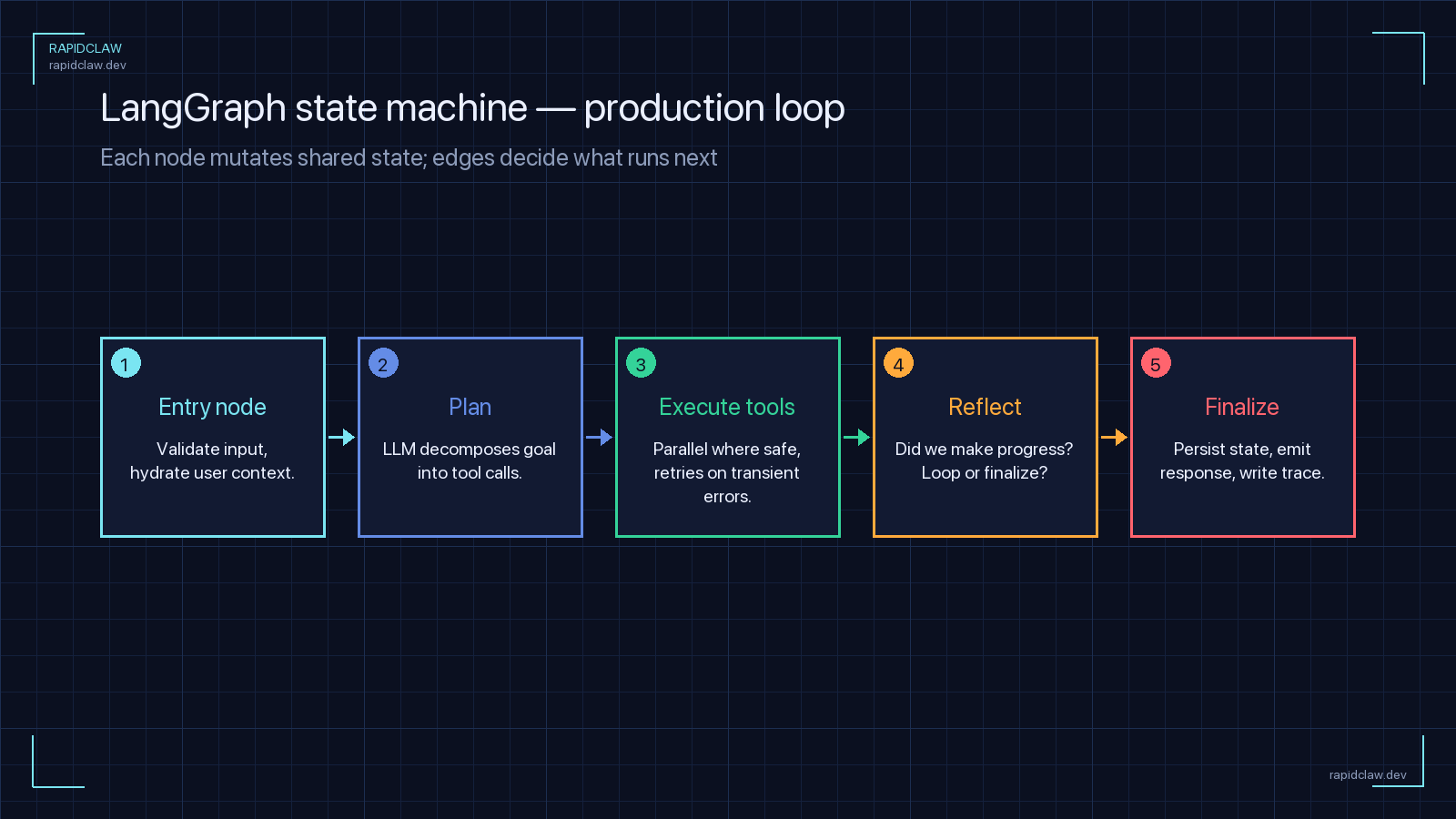
A LangGraph StateGraph is defined by a state schema. In prototypes that schema is often a loose dict. In production, define it as a TypedDict so every field is explicit, serializable, and validated. The schema is your durable contract — it’s what gets written to Postgres every time a node executes.
from typing import Annotated, TypedDict, Literal
from langgraph.graph.message import add_messages
from langchain_core.messages import AnyMessage

class AgentState(TypedDict):
    """Durable state for our production agent.

    Every field here is serialized to Postgres after every node.
    Keep it SMALL — no binary blobs, no giant payloads.
    """
    # Conversation history — add_messages is a reducer that appends
    messages: Annotated[list[AnyMessage], add_messages]

    # User context (stable per run)
    user_id: str
    tenant_id: str

    # Control flow
    step_count: int
    status: Literal["running", "awaiting_tool", "done", "error"]

    # Tool results — bounded by policy (keep last 5 only)
    recent_tool_calls: list[dict]

    # Token budget enforcement
    tokens_used: int
    tokens_budget: int
Rule of thumb: if it’s in state, it’s in Postgres
Every key in AgentState gets written on every checkpoint. A 10MB payload per step × 50 steps × 1000 concurrent runs = 500GB of checkpoint traffic. Keep state tiny. Store large artifacts (PDFs, images, long documents) in S3 and keep only the URI in state.
Step 3: Enable Postgres Checkpointing
MemorySaver is for tutorials. PostgresSaver is for production. Swap them out and you get three things for free: crash recovery, multi-worker coordination, and point-in-time replay of any failed run.
from langgraph.graph import StateGraph, START, END
from langgraph.checkpoint.postgres import PostgresSaver
from psycopg_pool import ConnectionPool
import os

from agent.state import AgentState
from agent.nodes import call_model, execute_tools, should_continue

# Build the graph once at import time — it's stateless
def build_graph():
    workflow = StateGraph(AgentState)
    workflow.add_node("model", call_model)
    workflow.add_node("tools", execute_tools)
    workflow.add_edge(START, "model")
    workflow.add_conditional_edges(
        "model",
        should_continue,
        {"tools": "tools", "done": END},
    )
    workflow.add_edge("tools", "model")
    return workflow

# Connection pool — tune min/max to your worker count
pool = ConnectionPool(
    conninfo=os.environ["DATABASE_URL"],
    min_size=5,
    max_size=20,
    kwargs={"autocommit": True, "prepare_threshold": 0},
)

# Bind the checkpointer — survives restarts, shared across workers
checkpointer = PostgresSaver(pool)
checkpointer.setup()  # Idempotent — safe to call on every boot

graph = build_graph().compile(checkpointer=checkpointer)
Three production details that aren’t in the LangGraph quickstart:
autocommit=Trueavoids long-running transactions that hold Postgres locks during LLM calls.prepare_threshold=0disables prepared statements, which is safer behind a pooler like PgBouncer.checkpointer.setup()creates the schema automatically — run it once on deploy, keep it idempotent.
Run the graph with a thread_id per conversation so replays are deterministic and resumable:
from agent.graph import graph

def run_turn(thread_id: str, user_message: str, user_id: str):
    config = {
        "configurable": {"thread_id": thread_id},
        "recursion_limit": 25,   # HARD CAP on node visits
    }
    result = graph.invoke(
        {
            "messages": [{"role": "user", "content": user_message}],
            "user_id": user_id,
            "step_count": 0,
            "tokens_used": 0,
            "tokens_budget": 100_000,
            "status": "running",
            "recent_tool_calls": [],
        },
        config=config,
    )
    return result
Step 4: Containerize the Graph
Wrap the graph behind a FastAPI process. Every production orchestrator (Kubernetes, ECS, Nomad, Rapid Claw) knows how to run a container; none of them natively understand langgraph dev.
from fastapi import FastAPI, HTTPException
from pydantic import BaseModel
from agent.run import run_turn
import uuid

app = FastAPI(title="langgraph-agent", version="1.0")

class TurnRequest(BaseModel):
    thread_id: str | None = None
    user_id: str
    message: str

@app.post("/v1/chat")
def chat(req: TurnRequest):
    thread_id = req.thread_id or str(uuid.uuid4())
    try:
        result = run_turn(thread_id, req.message, req.user_id)
    except Exception as e:
        # Log with thread_id — that's your replay handle
        raise HTTPException(status_code=500, detail={
            "thread_id": thread_id,
            "error": str(e),
        })
    return {"thread_id": thread_id, "result": result}

@app.get("/healthz")
def health():
return {"status": "ok"}FROM python:3.12-slim AS base
# Non-root user — never run the graph as root
RUN useradd -m -u 10001 agent
WORKDIR /app
# Install deps first (Docker layer cache)
COPY requirements.txt .
RUN pip install --no-cache-dir -r requirements.txt
# Copy code
COPY agent/ ./agent/
COPY api/ ./api/
USER agent
EXPOSE 8080
# gunicorn for multi-worker; tune worker count to CPU + DB pool size
CMD ["gunicorn", "api.main:app", \
"--worker-class", "uvicorn.workers.UvicornWorker", \
"--workers", "4", \
"--bind", "0.0.0.0:8080", \
"--timeout", "120", \
"--graceful-timeout", "30"]Worker count != free parallelism
Each gunicorn worker opens its own Postgres connection pool. workers × pool.max_size must stay under your Postgres max_connections (default 100). Put a PgBouncer in front if you run more than a handful of replicas — it multiplexes connections so you can scale workers without scaling Postgres.
Step 5: Scale Graph-Based Agents Horizontally
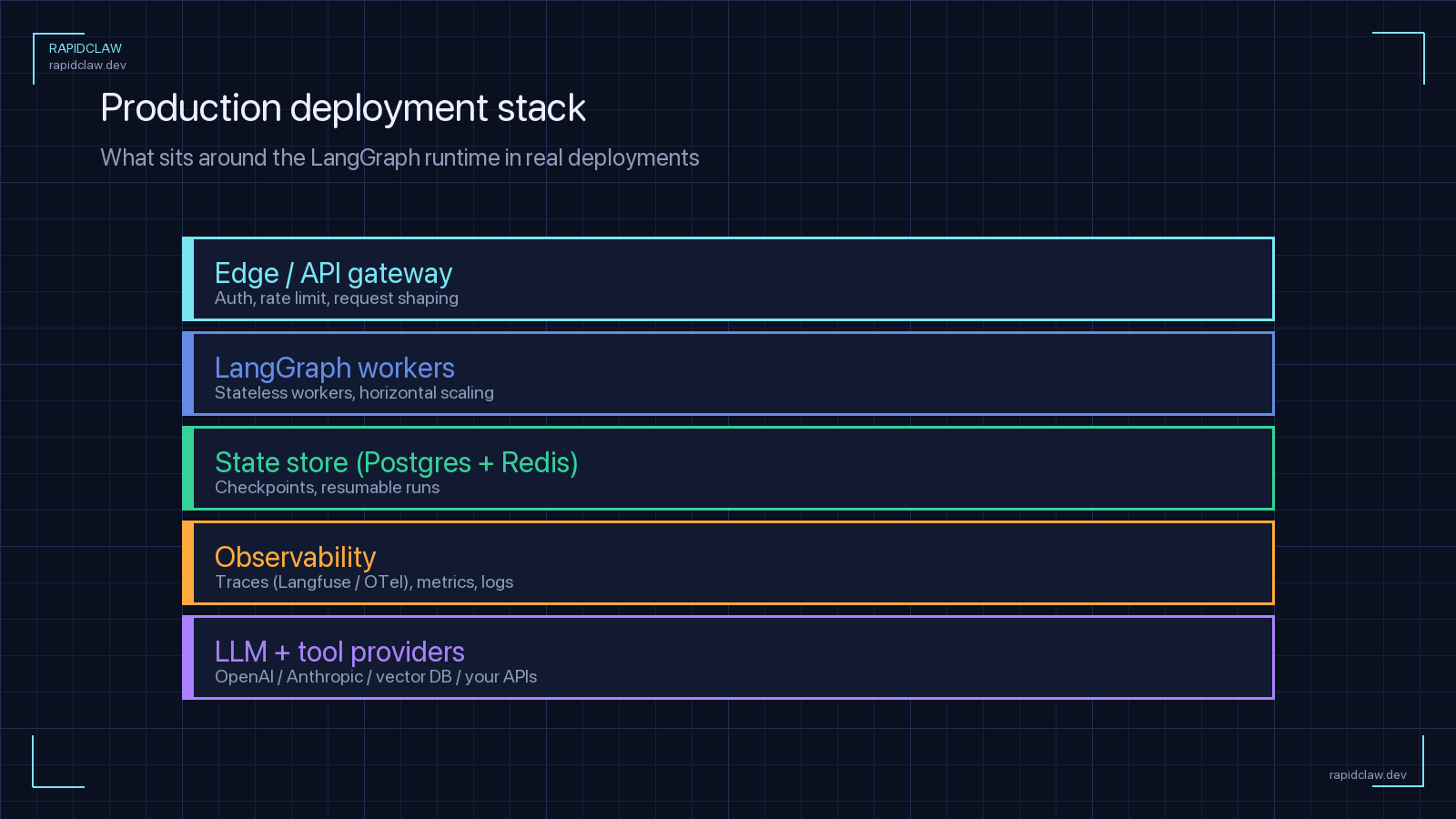
Because checkpoints live in Postgres, any worker can pick up any thread. That makes LangGraph almost horizontally scalable — but you still need coordination for long-running runs, locking, and rate limits.
The scaling architecture
At N replicas, the pattern looks like this:
                    ┌────────────────┐
   Client ────►      │  Load Balancer │
                     └────────┬───────┘
                              │
              ┌───────────────┼───────────────┐
              ▼               ▼               ▼
      ┌────────────┐  ┌────────────┐  ┌────────────┐
      │  Worker 1  │  │  Worker 2  │  │  Worker N  │
      │ (gunicorn) │  │ (gunicorn) │  │ (gunicorn) │
      └──────┬─────┘  └──────┬─────┘  └──────┬─────┘
             │               │               │
             └───────┬───────┴───────┬───────┘
                     ▼               ▼
             ┌───────────────┐ ┌───────────────┐
             │   Postgres    │ │     Redis     │
             │ (checkpoints) │ │ (rate limits) │
             └───────────────┘ └───────────────┘
Kubernetes HPA for graph workers
Autoscale on in-flight graph runs, not CPU. Long-running LLM calls barely touch the CPU but tie up workers:
apiVersion: autoscaling/v2
kind: HorizontalPodAutoscaler
metadata:
  name: langgraph-agent
  namespace: ai-agents
spec:
  scaleTargetRef:
    apiVersion: apps/v1
    kind: Deployment
    name: langgraph-agent
  minReplicas: 3
  maxReplicas: 30
  metrics:
    # Scale on custom metric: in-flight graph runs per pod
    - type: Pods
      pods:
        metric:
          name: langgraph_runs_in_flight
        target:
          type: AverageValue
          averageValue: "10"
  behavior:
    scaleDown:
      # Don't scale down aggressively — runs can take minutes
      stabilizationWindowSeconds: 300
      policies:
        - type: Percent
          value: 20
          periodSeconds: 60
Avoid the dual-write race
If two requests hit different workers for the same thread_id simultaneously, they’ll both load the same checkpoint and race to write the next one. Either serialize by thread (Redis lock) or accept last-write-wins and design your state reducers to tolerate it.
import redis
from contextlib import contextmanager
import time

r = redis.Redis.from_url(os.environ["REDIS_URL"])

@contextmanager
def thread_lock(thread_id: str, ttl_sec: int = 300):
    """Serialize graph runs per thread to prevent checkpoint races."""
    key = f"graph:lock:{thread_id}"
    token = f"{time.time()}-{os.getpid()}"
    acquired = r.set(key, token, nx=True, ex=ttl_sec)
    if not acquired:
        raise RuntimeError(f"thread {thread_id} is already running")
    try:
        yield
    finally:
        # Only release if we still own the lock
        if r.get(key) == token.encode():
            r.delete(key)
Step 6: Monitor LangGraph Execution
HTTP status codes tell you if the request succeeded. They tell you nothing about what the agent did. You need three signals: per-node traces, per-run token counts, and a replay handle (the thread_id) in every log line.
from opentelemetry import trace
from opentelemetry.sdk.trace import TracerProvider
from opentelemetry.sdk.trace.export import BatchSpanProcessor
from opentelemetry.exporter.otlp.proto.grpc.trace_exporter import OTLPSpanExporter
from functools import wraps

trace.set_tracer_provider(TracerProvider())
trace.get_tracer_provider().add_span_processor(
    BatchSpanProcessor(OTLPSpanExporter(endpoint=os.environ["OTEL_ENDPOINT"]))
)
tracer = trace.get_tracer("langgraph-agent")

def traced_node(node_name: str):
    """Wrap a LangGraph node so every execution emits a span."""
    def decorator(fn):
        @wraps(fn)
        def wrapper(state):
            with tracer.start_as_current_span(f"node.{node_name}") as span:
                span.set_attribute("thread_id", state.get("thread_id", ""))
                span.set_attribute("step_count", state.get("step_count", 0))
                span.set_attribute("tokens_used", state.get("tokens_used", 0))
                try:
                    result = fn(state)
                    span.set_attribute("status", "ok")
                    return result
                except Exception as e:
                    span.set_attribute("status", "error")
                    span.record_exception(e)
                    raise
        return wrapper
    return decorator

# Apply to each node
@traced_node("call_model")
def call_model(state):
    # ... your model call
    ...
Four metrics to dashboard:
- Nodes per run — flat lines are healthy, spikes mean loops.
- Tokens per run — the real cost driver.
- P95 run duration — the number that pages on-call.
- Checkpoint write latency — the first thing to go when Postgres struggles.
For a broader treatment, see the self-hosted AI agent observability guide — same patterns, more frameworks.
Step 7: Common Deployment Pitfalls (and How to Fix Them)
Infinite recursion between nodes
A conditional edge routes back to the model, the model calls the same tool, the tool fails the same way — forever. Set recursion_limit on every invoke and a hard step_count ceiling in state. LangGraph raises GraphRecursionError automatically; catch it and mark the run as status="error".
Checkpoint bloat
Every node write creates a new checkpoint row. After a million turns you have a very large, very slow table. Run a nightly job to delete checkpoints for threads older than N days, or use PostgresSaver’s TTL extensions. Don’t discover this when the DB hits 90% disk usage.
Breaking schema changes
You add a field to AgentState and deploy. Old in-flight threads deserialize with a missing key and crash on the next node. Either make every new field NotRequired[...] with a default, or version your state and migrate on load. Never rename a field in place.
Unbounded message history
The add_messages reducer appends forever. After 500 turns the prompt is 200K tokens and every call costs a fortune. Add a summarization node or a rolling-window trim reducer so the message list stays bounded.
Non-idempotent tools inside retries
A tool sends an email. The graph checkpoint fails right after. On replay, the email sends again. Bad. Make every tool call idempotent by including a deterministic request key (e.g. f"{thread_id}:{step}") that the downstream API uses to de-duplicate.
Step 8: The Easy Path — Deploy LangGraph on Rapid Claw
Steps 1–7 are the work. They’re also the work you’ll be doing on-call for the next two years: rotating DB credentials, tuning the pooler, patching the CVE in your base image, restarting the worker that pinned a checkpoint lock. None of that is your product.
Rapid Claw runs LangGraph as a managed service. You ship a langgraph.json manifest; Rapid Claw handles the Postgres, the checkpointer, the observability, the autoscaling, and the security hardening. The LangGraph alternatives comparison goes deeper on the framework-level tradeoffs if you’re still evaluating. This section is the shortest possible path from code to production.
{
  "graphs": {
    "agent": "./agent/graph.py:graph"
  },
  "env": ".env",
  "python_version": "3.12",
  "dependencies": ["."],
  "rapidclaw": {
    "checkpointer": "postgres",
    "min_replicas": 3,
    "max_replicas": 30,
    "scaling_metric": "runs_in_flight",
    "target_value": 10,
    "observability": {
      "otel": true,
      "log_level": "info"
    },
    "security": {
      "egress": "allowlist",
      "allowed_hosts": [
        "api.anthropic.com",
        "api.openai.com"
      ]
    }
  }
}
Then:
# install the CLI
npm i -g @rapidclaw/cli

# authenticate
rapidclaw login

# deploy the graph
rapidclaw deploy --manifest langgraph.json

# check status
rapidclaw status
# → agent  v12  running  3 replicas  p95=1.4s  $0.00142/turn
That’s the whole production path. No Dockerfile to maintain, no HPA to tune, no PgBouncer to configure. If the graph needs more capacity, max_replicas goes up. If you want deeper infrastructure context, the complete guide to AI agent hosting covers what Rapid Claw is doing under the hood for you.
Production LangGraph: The Short Version
Audit requirements in numbers
Runtime, concurrency, recovery, token budget, owner. Answer before deploying.
Typed state schema
TypedDict AgentState with every field small and serializable.
PostgresSaver, not MemorySaver
Durable checkpoints with a tuned connection pool.
FastAPI + gunicorn container
Multi-worker, non-root, healthcheck, sensible timeouts.
Horizontal scale with shared state
Autoscale on in-flight runs. Lock per thread to avoid checkpoint races.
Per-node OpenTelemetry traces
Thread ID, step count, tokens on every span. Four dashboards, not forty.
Kill the five pitfalls
Recursion limit, checkpoint TTL, additive schema changes, bounded history, idempotent tools.
Or skip 1–7 and ship to Rapid Claw
One manifest, one deploy command, production-ready LangGraph.
Frequently Asked Questions
Can I deploy LangGraph to production with just MemorySaver?
Only if you’re comfortable losing every in-flight run on every restart, and only if you run exactly one worker forever. For any real deployment, use PostgresSaver (or an equivalent durable backend). The migration is a one-line swap in the code; the operational difference is enormous.
How many workers per Postgres instance?
Start with the formula workers × pool.max_size < postgres.max_connections × 0.7. Above a handful of replicas, put PgBouncer in front so you can scale workers without changing Postgres. Rapid Claw does this automatically.
What’s the best way to handle long-running graph runs?
Don’t hold the HTTP connection. Return the thread_id immediately and run the graph asynchronously (Celery, Arq, or a background task per worker). Clients poll or subscribe for updates. This is the single biggest source of production outages for teams that deploy LangGraph naively.
Do I need Redis if I already have Postgres?
For the checkpointer, no — Postgres is enough. Redis earns its keep for two other jobs: per-thread locks (Step 5) and per-tool rate limiting. Both can be done in Postgres, but Redis is cheaper and faster for these patterns.
Can I use LangGraph Cloud instead?
Yes, and it’s a reasonable option if you’re already deep in the LangChain ecosystem. Rapid Claw differentiates on framework neutrality (same platform runs LangGraph, CrewAI, AutoGen, Hermes Agent, and OpenClaw), on managed security controls (firewall, scoped keys, tenant-isolated VPCs), and on transparent token-routing cost controls. Try both and pick based on your team’s actual workload.
Skip the eight-step path
Rapid Claw runs your LangGraph agent with managed Postgres checkpointing, autoscaling, observability, and firewall controls out of the box. Ship a manifest, get a production URL.
Deploy LangGraph on Rapid ClawRelated reading
Framework-level tradeoffs when LangGraph feels like too much ops work
AI Agent Framework Comparison 2026LangGraph vs Hermes, CrewAI, AutoGen, OpenClaw across 10 dimensions
AI Agent Hosting [Complete Guide]Infrastructure patterns, cost breakdowns, and security for production agents
AI Agent ObservabilityLogs, metrics, and OpenTelemetry traces for self-hosted agents
Why AI Agents Fail in ProductionFive failure modes that hit every framework — with fixes
AI Agent Memory & State ManagementContext, persistence, and vector stores for production agents