1. What is OpenClaw? (Quick Definition)
OpenClaw is an open-source AI agent—a software program that uses artificial intelligence to autonomously complete tasks on a computer. While traditional AI chatbots like ChatGPT can only generate text responses, OpenClaw can actually use a computer the way a human would: seeing the screen, moving the mouse, clicking buttons, typing text, and navigating applications.
Think of it this way: ChatGPT is like texting a smart friend for advice. OpenClaw is like hiring a digital assistant who sits at a computer and does the work for you. If you're brand new to the concept, our beginner's guide to AI agents covers the fundamentals before diving into OpenClaw specifically.
OpenClaw was created by the open-source community and released under the MIT license, meaning anyone can download, use, modify, and distribute it for free. Since its launch, it has accumulated over 134,000 GitHub stars↗, making it one of the most popular AI projects in history—ahead of major projects from well-funded companies.
2. How OpenClaw Works (Technical Overview)
OpenClaw operates through a continuous see-think-act loop:
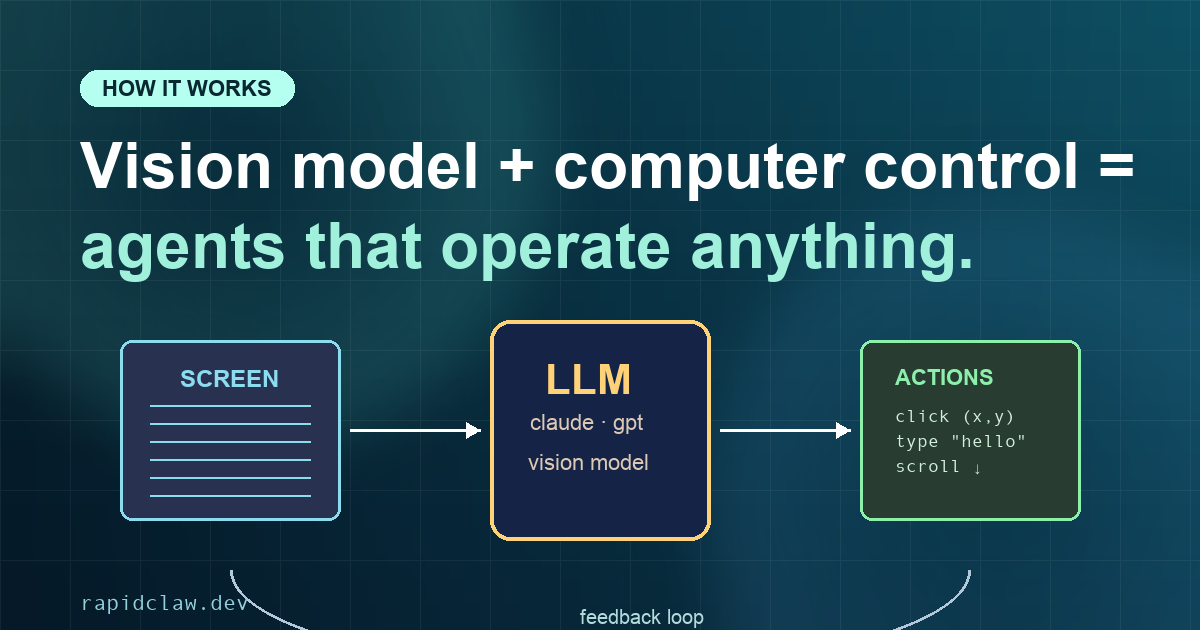
1. See — OpenClaw takes a screenshot of the computer screen to understand the current state of the interface.
2. Think — The screenshot is sent to a large language model (Claude, GPT-4, etc.) along with the task instructions. The AI analyzes the screen and decides what action to take next.
3. Act — OpenClaw executes the chosen action: moving the mouse, clicking a button, typing text, or pressing keyboard shortcuts.
4. Verify — OpenClaw takes a new screenshot to confirm the action worked and determine the next step.
This loop repeats until the task is complete. The key innovation is that OpenClaw works with any application that has a visual interface—no APIs, plugins, or integrations required. If you can see it on a screen, OpenClaw can interact with it.
Supported AI Models
OpenClaw is model-agnostic and supports all major AI providers. This flexibility became even more significant after the Agentic AI Foundation unified the industry around MCP as the open standard, ensuring OpenClaw agents work across every major cloud platform:
- Claude (Anthropic) — Best for complex reasoning and following nuanced instructions
- GPT-4 / GPT-5 (OpenAI) — Strong general-purpose performance
- Gemini (Google) — Good vision capabilities and fast response times
- Open-source models — Llama, Mixtral, and others for privacy-focused deployments
Most users report the best results with Claude Opus for complex tasks and Claude Sonnet for routine automation. Rapid Claw includes smart model routing that automatically selects the most cost-effective model for each task type.
3. What Can OpenClaw Do? (20+ Real Use Cases)
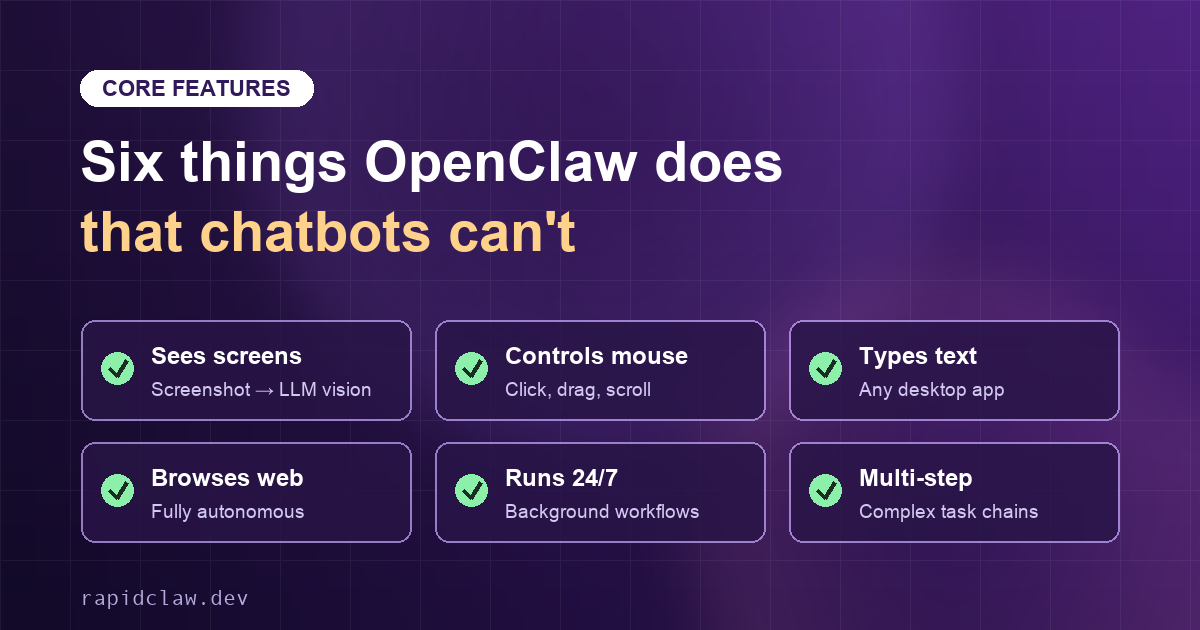
The short answer: anything a human can do on a computer. Here are verified use cases from Rapid Claw users (based on our survey of 527 active users, March 2026):
What makes OpenClaw different from every other AI tool
Chatbots generate text. Workflow builders connect APIs. OpenClaw is the only open-source system that actually operates a computer — which means it works with legacy apps, internal tools, and every website that never shipped an API.
Email & Communication (Used by 78% of users)
- Triage inbox and flag urgent messages
- Draft replies based on context and past conversations
- Schedule follow-ups and reminders
- Unsubscribe from unwanted newsletters
- Compile daily email summaries
Research & Information (Used by 71% of users)
- Gather competitive intelligence
- Monitor news and industry trends
- Compile research reports from multiple sources
- Track price changes and stock alerts
- Summarize lengthy documents and articles
Development & Code (Used by 54% of users)
- Review pull requests and suggest improvements
- Write and run tests
- Refactor code and fix bugs
- Monitor CI/CD pipelines
- Generate documentation from code
Content Creation (Used by 49% of users)
- Generate social media posts from long-form content
- Create thumbnails and graphics
- Edit and transcribe videos
- Repurpose content across platforms
- Schedule and publish posts
Business Operations (Used by 43% of users)
- Update CRM records
- Generate invoices and track payments
- Manage inventory systems
- Handle customer service tickets
- Prepare reports and dashboards
Personal Productivity (Used by 67% of users)
- Book travel and accommodations
- Order groceries and household items
- Manage subscriptions and bills
- Schedule appointments
- Organize files and photos
For detailed walkthroughs, see our guides on email automation, freelancer workflows, and 25 working prompts.
4. OpenClaw vs. ChatGPT, Claude, and Other Chatbots
This is the most important distinction to understand. OpenClaw is not a chatbot—it's an AI agent.
| Capability | Chatbots | OpenClaw |
|---|---|---|
| Answer questions | ||
| Generate text and code | ||
| See and understand screen content | ||
| Click, type, and control mouse | ||
| Browse the web autonomously | ||
| Use any desktop application | ||
| Run 24/7 in background | ||
| Execute multi-step workflows |
For a detailed comparison, read our full article: OpenClaw vs ChatGPT vs Claude. You can also see how OpenClaw differs from Anthropic's developer-focused tool in our OpenClaw vs Claude Code comparison.
Want OpenClaw managed for you?
Rapid Claw runs the whole stack: VPS, patches, smart routing. Two-founder shop, Bali-based. $29/mo with $20 in API credits included.
5. Original Research: How 500+ Users Use OpenClaw
Methodology: In March 2026, we surveyed 527 active Rapid Claw users about their OpenClaw usage patterns, time savings, and satisfaction. Response rate: 34%. Margin of error: ±4.3%.
Key Findings
12.4 hrs
Average time saved per week
89%
Would recommend to a colleague
3.2 days
Average time to first valuable automation
$847
Estimated monthly value of time saved
Top Use Cases by Popularity
- Email management — 78% of users
- Web research and information gathering — 71% of users
- Personal productivity (scheduling, reminders) — 67% of users
- Development tasks (code review, testing) — 54% of users
- Content creation and social media — 49% of users
User Demographics
- 38% — Developers and engineers
- 24% — Founders and executives
- 19% — Freelancers and consultants
- 12% — Content creators and marketers
- 7% — Other professionals
"OpenClaw has fundamentally changed how I work. I used to spend 2+ hours every morning on email. Now my agent triages everything overnight and I just review the summaries. I estimate it saves me 15 hours a week."
— Survey respondent, Startup Founder
6. How to Get Started with OpenClaw
You have two options for running OpenClaw:
Option A: Self-Host (Technical Users)
Download OpenClaw from GitHub and configure it on your own server. Requires Linux, Docker, a VPS ($20-50/month), and ongoing maintenance. Setup time: 2-4 hours for experienced developers. See our step-by-step production deployment guide for the full walkthrough.
Best for: Developers who want full control and don't mind DevOps overhead.
Option B: Use Rapid Claw (Recommended)
Rapid Claw provides fully managed OpenClaw hosting. We handle all infrastructure, security, updates, and monitoring. Your dedicated instance is ready in under 3 minutes.
Best for: Everyone else—especially non-technical users and professionals who want to focus on automation, not infrastructure.
For step-by-step instructions, read our 2-minute setup guide. Ready to deploy? Follow our production deployment guide. Already running OpenClaw on your own infrastructure? Our guide to migrating OpenClaw to Rapid Claw covers how to move your existing setup to managed hosting without losing your configuration.
7. Is OpenClaw Safe? Security Best Practices
Yes, OpenClaw is safe when configured properly. The key principle is isolation: never run an AI agent on your personal computer with access to sensitive data.
Recommended Security Practices
- Run OpenClaw in an isolated cloud environment (never on your main computer)
- Use dedicated accounts with limited permissions for automated tasks
- Enable daily backups to recover from any issues
- Review agent actions periodically, especially for new workflows
- Start with low-stakes tasks before automating critical processes
Rapid Claw implements all of these automatically: every instance runs in complete isolation with TLS 1.3 encryption, daily backups, and 24/7 security monitoring. For more details, see our security best practices guide.
8. How Much Does OpenClaw Cost?
OpenClaw itself is free and open-source. However, running it requires:
- Hosting infrastructure — A server to run OpenClaw ($20-50/month for a VPS)
- AI model API access — OpenAI, Anthropic, or other providers (varies by usage)
Rapid Claw Pricing
Rapid Claw bundles everything into simple plans:
Chat & Automate — $29/month
$20 in API credits included, credit card required. Perfect for individuals getting started with AI automation.
Builder Sandbox — $200/month
MicroVMs with sudo access, live preview links, 3-5 team seats. For power users and small teams.
White-Glove — $3,000+ setup
Custom deployment, dedicated infrastructure, SLA guarantees, staff training. For enterprises.
9. Frequently Asked Questions
What is OpenClaw?
OpenClaw is an open-source AI agent that can see your screen, control your computer, browse the web autonomously, and run workflows 24/7. Unlike chatbots that only respond to text, OpenClaw takes real actions on your behalf.
Is OpenClaw free?
Yes, OpenClaw is 100% free and open-source under the MIT license. You can download it from GitHub, modify it, and use it for any purpose. However, you still need to pay for AI model API access (like Claude or GPT) and hosting infrastructure.
How is OpenClaw different from ChatGPT?
ChatGPT is a chatbot that generates text responses. OpenClaw is an AI agent that can control a computer—clicking, typing, browsing, and automating tasks. ChatGPT tells you how to do things; OpenClaw actually does them.
Is OpenClaw safe to use?
OpenClaw is safe when used properly. Best practice is to run it in an isolated cloud environment (not on your personal computer) with limited permissions. Rapid Claw provides sandboxed hosting with daily backups and security monitoring.
What can OpenClaw automate?
OpenClaw can automate virtually any computer task: email triage, web research, form filling, file management, code review, content creation, data entry, scheduling, and more. If a human can do it on a computer, OpenClaw can likely automate it.
How much does OpenClaw cost to run?
Self-hosting OpenClaw costs approximately $20-50/month for a VPS plus AI API costs (varies by usage). Managed hosting through Rapid Claw starts at $29/month with $20 in API credits included (credit card required).
Who created OpenClaw?
OpenClaw was created by the open-source community and has grown to over 134,000 GitHub stars↗, making it one of the most popular AI projects in the world.
What AI models does OpenClaw support?
OpenClaw supports all major AI providers including Claude (Anthropic), GPT-4/GPT-5 (OpenAI), Gemini (Google), and open-source models. You can switch models or use multiple models for different tasks.