Microsoft Agent Governance Toolkit: The Complete 2026 Guide
April 20, 2026·18 min read
On April 2, 2026, Microsoft shipped the Microsoft Agent Governance Toolkit (MAGT) — a runtime-agnostic governance layer for enterprise AI agents. It puts policy, audit, and lifecycle management in a single control plane that sits above AutoGen, Semantic Kernel, LangGraph, OpenClaw, and Hermes Agent. This guide covers what it does, why it matters, how it integrates with the stack you already run, and a practical path to adopting it on Rapid Claw.
TL;DR
The Microsoft Agent Governance Toolkit is a governance sidecar, not a new agent runtime. It gives you a central agent registry, a policy engine for tool calls and model invocations, an egress proxy for model traffic, and immutable audit logging that maps to SOC 2 and HIPAA controls. Azure-native mode hooks into Entra ID and Purview; portable mode runs anywhere as a container. Rapid Claw Enterprise ships MAGT portable mode alongside every OpenClaw and Hermes Agent deployment so you skip the control-plane buildout entirely.
Want MAGT running without standing up your own control plane?
Try Rapid Claw (5 free msgs · $29/m after)Table of Contents
1. What the Microsoft Agent Governance Toolkit Actually Is
The Microsoft Agent Governance Toolkit — MAGT, if you want the acronym that every vendor deck is about to start using — is a governance layer for autonomous AI agents. Microsoft announced it at Build last year as a research preview and released it generally on April 2, 2026. The deliberate design choice worth understanding up front is this: MAGT is runtime-agnostic. It does not ship a new agent framework. It wraps the frameworks you are already running.
In practice, that means MAGT does not care whether your agent was built with AutoGen, Semantic Kernel, LangGraph, OpenClaw, Hermes Agent, or a home-grown Python loop. It sits between the agent and the outside world — tool calls, model APIs, filesystem access, outbound HTTP — and evaluates every action against policy before it happens. When the action completes, it records a structured audit event.
The toolkit ships in two flavors:
Azure-native mode
Integrates directly with Entra ID for agent identity, Microsoft Purview for data-loss prevention and audit retention, and Defender for Cloud for threat detection. This is the most frictionless path if your stack is already in Azure, but it couples you tightly to the Microsoft ecosystem.
Portable mode
Ships as an OCI-compatible container with a gRPC control plane, a REST admin API, and OTLP audit export. Runs on AWS, GCP, on-prem Kubernetes, or a managed platform like Rapid Claw. You lose some of the Entra/Purview conveniences but keep the core policy engine, the agent registry, and the audit stream.
The portable mode is the part worth paying attention to if you are not an Azure shop. It is published under an Apache-2.0-style license with a few Microsoft trademark carve-outs, and it interoperates with the Azure-native components over the same gRPC contract — so a multi-cloud enterprise can run portable-mode MAGT on AWS while still feeding audit events into a Purview tenant elsewhere.
2. Why It Matters for AI Agent Hosting
To understand why Microsoft bothered shipping this, look at what enterprises actually did through 2025. Teams deployed agents on three, four, sometimes six different frameworks. Marketing built with AutoGen. Finance used Semantic Kernel. A product team shipped an OpenClaw deployment. Legal stood up something bespoke on LangGraph. None of those frameworks share a governance model, a policy language, or an audit schema. Compliance teams were effectively asked to audit a polyglot zoo.
Three specific gaps kept showing up in enterprise retrospectives:
If you host AI agents for anyone other than yourself — customers, internal business units, regulated users — all three of those gaps land on you. MAGT’s pitch is that you solve them once, at the hosting layer, and stop solving them per framework.
That pitch is particularly sharp for hosting platforms. If you run a managed platform like Rapid Claw, you already sit between the agent and its environment — adding MAGT is the natural next step. For a self-hosted team, it means the governance layer becomes a one-time integration rather than a per-framework project. If you are already thinking about AI agent hosting at production scale, MAGT is the closest thing to a standard that currently exists.
3. Architecture: The Five Control Planes
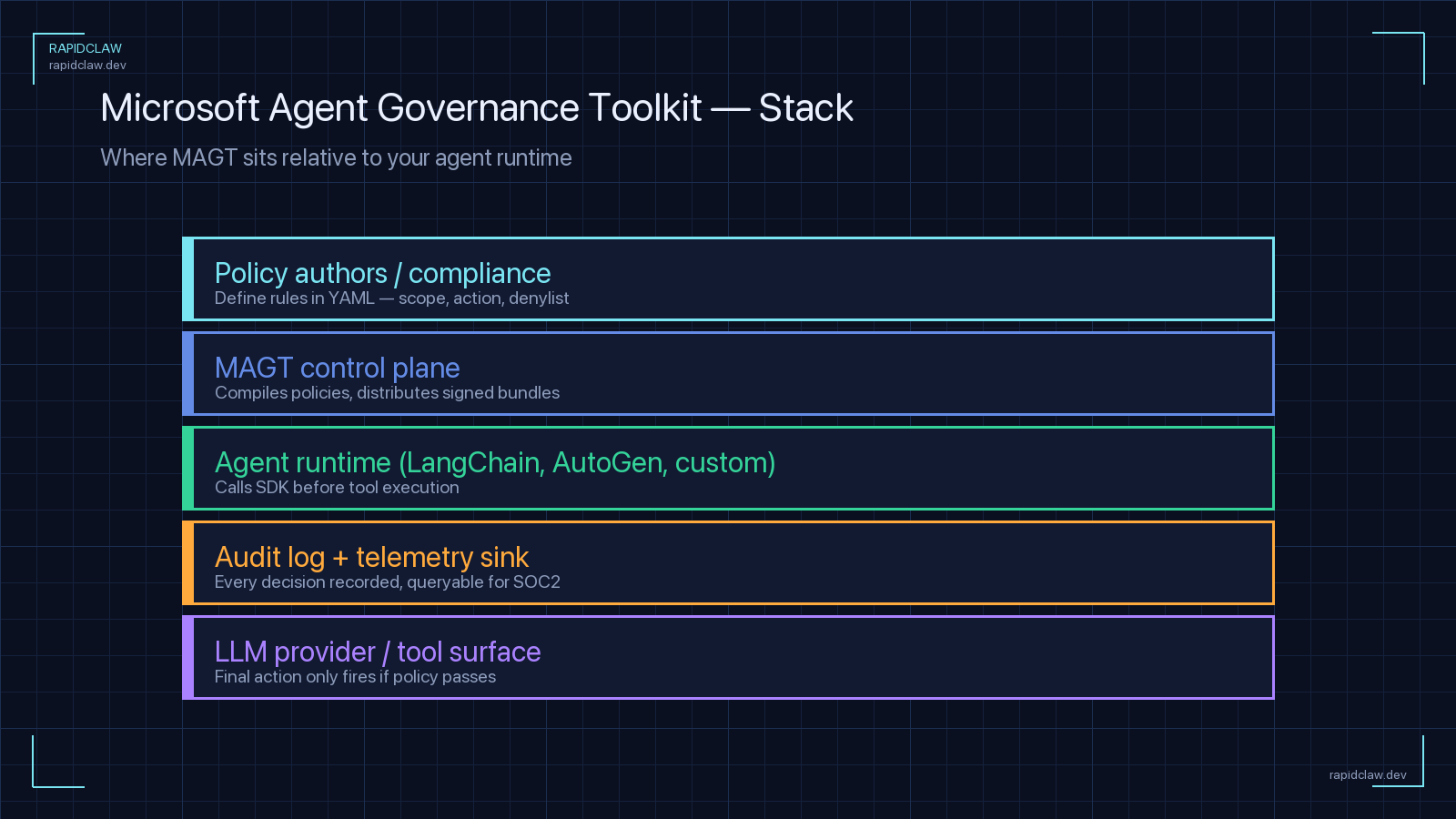
Conceptually, MAGT breaks down into five components. You can adopt them incrementally — running the registry without the policy engine is a common starting point — but the full value shows up when all five are wired together.
| Component | What It Does | Where It Sits |
|---|---|---|
| Agent Registry | Canonical catalog of every agent, version, owner, and environment | Control plane (gRPC + REST) |
| Policy Engine | Evaluates tool calls, model invocations, and data access against declarative policy | Inline sidecar / middleware |
| Egress Proxy | Routes model traffic through a policy-aware proxy for DLP and region pinning | Network layer |
| Audit Pipeline | Structured events with chain hashing and OTLP / Purview export | Streaming backplane |
| Lifecycle Manager | Handles agent creation, rotation, suspension, and retirement | Control plane |
The piece that surprises people is the egress proxy. Microsoft could have left model traffic alone and governed only tool calls, but they chose to route model API calls through a policy-aware proxy too. That means you can enforce region pinning on model inference (“this agent may only hit api.us.anthropic.com”), scrub PII from prompts before they leave your VPC, and count tokens against a per-agent budget. It is a heavier integration than the sidecar model, but it closes the last gap traditional observability tools tend to miss.
Each component exposes the same gRPC contract, which is what makes mix-and-match deployments possible. You can run the registry in Azure, the policy engine on AWS EKS, and ship audit events to an on-prem Splunk cluster. That contract is also what lets a managed platform host the entire thing on your behalf without lock-in.
4. How It Integrates With Existing Frameworks
Integration is the part most teams underestimate — and it is where MAGT’s design pays off. Microsoft ships first-party adapters for AutoGen and Semantic Kernel, obviously, but there are also community adapters for LangGraph, CrewAI, OpenClaw, and Hermes Agent. The adapter pattern is consistent across all of them: register the agent with the control plane, wrap the framework’s tool-dispatch surface, and let MAGT handle the rest.
For OpenClaw, the integration looks like this:
# openclaw_magt.py — wrap OpenClaw with MAGT
from openclaw import Agent
from magt import GovernanceClient, PolicyDecision

magt = GovernanceClient(
    control_plane="grpcs://magt.internal:8443",
    agent_id="agent-openclaw-sales-01",
    tenant_id="acme-prod",
)

# Register the agent once at startup
magt.register(
    framework="openclaw",
    version="1.14.2",
    owner="sales-automation@acme.com",
    capabilities=["email", "crm", "web_search"],
)

def governed_tool_call(tool_name: str, args: dict) -> str:
    """Ask MAGT for a decision before executing the tool."""
    decision: PolicyDecision = magt.evaluate(
        action="tool_call",
        resource=tool_name,
        args=args,
    )
    if not decision.allowed:
        magt.audit_denied(tool_name, reason=decision.reason)
        raise PermissionError(decision.reason)

    result = Agent.run_tool(tool_name, args)

    magt.audit_allowed(
        tool_name,
        args=args,
        result_summary=result[:200],
    )
    return result
Hermes Agent, being YAML-first, wires MAGT in at the deployment level rather than in code:
# hermes-magt.yaml — MAGT integration for Hermes Agent
governance:
  provider: microsoft-magt
  mode: portable          # azure-native | portable
  control_plane:
    endpoint: "grpcs://magt.internal:8443"
    auth: workload-identity

  agent:
    id: agent-hermes-support-01
    tenant: acme-prod
    owner: support-ops@acme.com

  policy:
    bundle_ref: "acme/hermes-support@v3"
    refresh_seconds: 300
    fail_mode: closed     # deny on control-plane outage

  egress_proxy:
    enabled: true
    upstream: "magt-egress.internal:9443"
    scrub_pii: true
    region_pin: "us-east-1"

  audit:
    export: otlp
    endpoint: "https://otel-collector.internal:4317"
    include:
      - tool_calls
      - model_invocations
      - memory_access
      - permission_changes
Two design notes worth flagging. First, fail_mode: closed is the safer default — if the MAGT control plane is unreachable, deny the action rather than fall through. Most teams start with fail_mode: open during rollout and flip it once they trust the control plane’s availability. Second, the egress proxy is optional on the Hermes side, which matters if you are running inside a VPC where outbound traffic already flows through an existing proxy — MAGT can observe those logs instead of inserting another hop.
5. Getting Started: A Practical Walkthrough
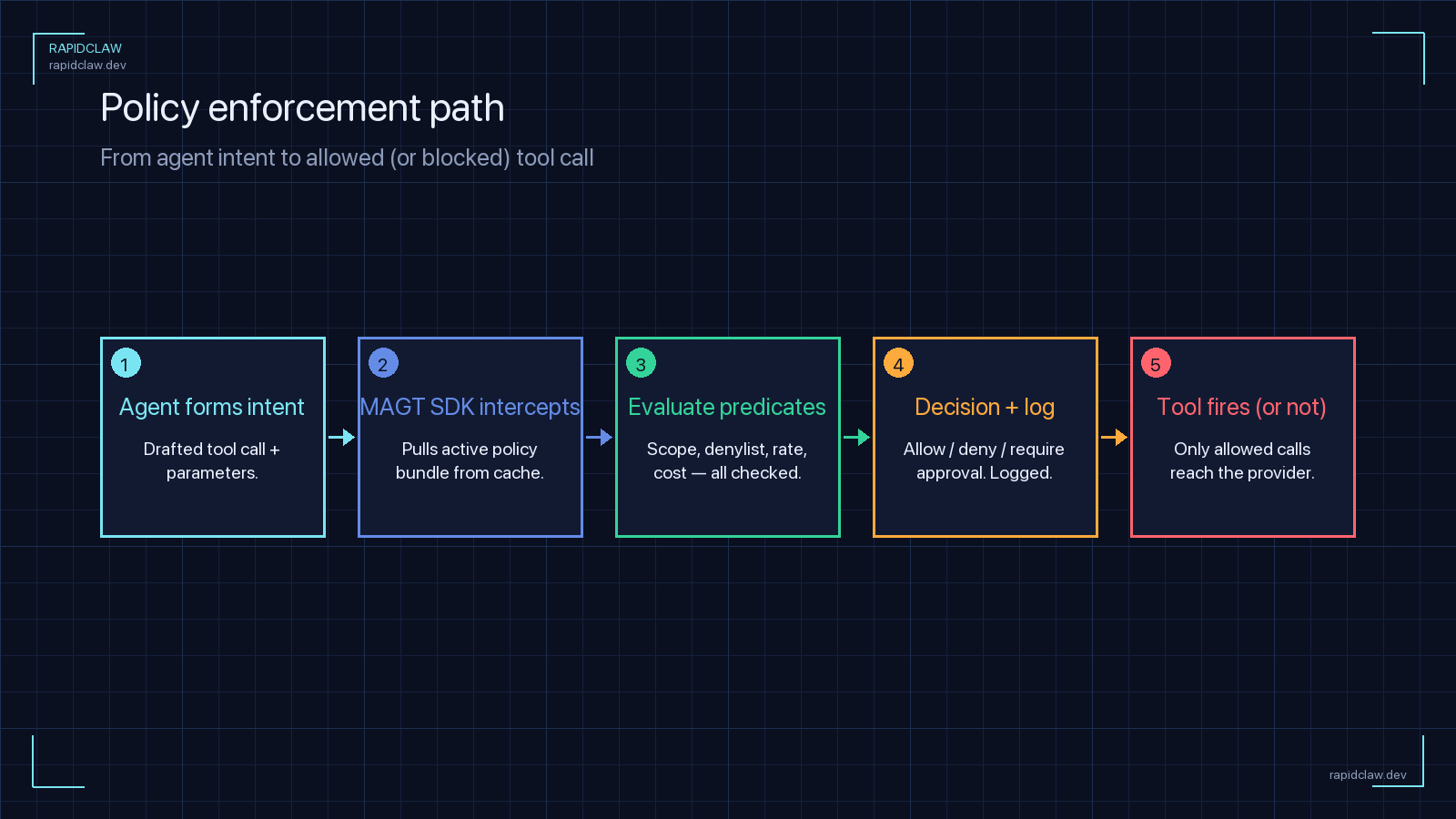
Enough theory. Here is a realistic first-week plan for adopting MAGT on a portable-mode deployment. The goal is to get one real agent under governance end-to-end before scaling to the rest of your fleet.
Day 1 — Stand up the control plane
Pull the portable-mode container, deploy it behind TLS, and point it at a Postgres instance for the registry and a durable object store (S3, GCS, or Azure Blob) for the audit chain. If you are on Rapid Claw Enterprise, this step is done for you.
Day 2 — Register your first agent
Pick an agent that is already in production but is low-risk — a research or summarization agent is a good fit. Register it through the admin API, assign an owner, and verify the registry entry shows up in the dashboard.
Day 3 — Wire the adapter
Install the framework adapter and run with fail_mode: open and an empty policy bundle. At this stage you are only observing — every tool call and model invocation flows through MAGT and lands in the audit stream, but nothing is blocked.
Day 4 — Write your first two policies
Start small: one policy that enforces region pinning on model calls, and one that denies access to any tool outside the agent’s declared capability set. These two alone cover a large share of real-world policy violations.
Day 5 — Flip to fail-closed
Once you have 24 hours of clean audit data and your policies are matching expected traffic, flip fail_mode: closed. From this point on, a control-plane outage halts the agent rather than letting it act unsupervised. Alerting for control-plane health becomes part of your on-call rotation.
A week in, you have one fully governed agent and a working template. Onboarding the second, third, and tenth agent after that is mostly copy-paste — the control plane is shared, policies are reusable, and the adapter pattern is the same across frameworks.
6. Policy Examples You Will Actually Write
MAGT policies are declared in a Rego-inspired DSL that Microsoft calls AGP (Agent Governance Policy). If you have used OPA, it will feel familiar. Below are three policies that cover the most common enterprise asks.
# region-pinning.agp — block non-US model inference
package agents.model_calls

default allow = false

allow {
  input.action == "model_invocation"
  endswith(input.resource.endpoint, ".us.anthropic.com")
}

allow {
  input.action == "model_invocation"
  startswith(
    input.resource.endpoint,
    "https://api.openai.com",
  )
  input.resource.region == "us-east-2"
}

deny_reason[msg] {
  not allow
  msg := sprintf(
    "Model endpoint %s is outside allowed US regions",
    [input.resource.endpoint],
  )
}# capability-scoping.agp — enforce declared capabilities
package agents.tool_calls
default allow = false
allow {
input.action == "tool_call"
input.resource.name == declared_capability
declared_capability := input.agent.capabilities[_]
}
deny_reason[msg] {
not allow
msg := sprintf(
"Tool %s is outside agent %s declared capabilities %v",
[
input.resource.name,
input.agent.id,
input.agent.capabilities,
],
)
}# pii-redaction.agp — scrub PII before egress
package agents.egress
transform {
input.action == "model_invocation"
input.prompt_text != ""
output := {
"prompt_text": redact_pii(input.prompt_text),
"redactions_applied": true,
}
}
redact_pii(text) = redacted {
redacted := regex.replace(
text,
`[A-Za-z0-9._%+-]+@[A-Za-z0-9.-]+`,
"[EMAIL]",
)
}The pattern you will converge on quickly is a small policy bundle per agent class — one for customer-facing agents, one for internal-only agents, one for regulated-data agents — rather than per-agent policies. Bundles version-control cleanly and review like any other infrastructure code.
7. Audit Logging and Compliance Mapping
Every action that passes through MAGT produces a structured audit event. The schema is stable, chain hashing is on by default, and the stream can export to OTLP, Splunk HEC, an S3 object lock bucket, or directly into Microsoft Purview. The event shape looks like this:
{
  "schema": "magt.audit.v1",
  "event_id": "01HV8C3W3F6MY7QK9H2M4B5TXC",
  "timestamp": "2026-04-20T14:02:11.812Z",
  "tenant_id": "acme-prod",
  "agent": {
    "id": "agent-openclaw-sales-01",
    "version": "1.14.2",
    "framework": "openclaw"
  },
  "actor": {
    "user_id": "u_44f1",
    "session_id": "s_9a12"
  },
  "action": "tool_call",
  "resource": "crm.create_opportunity",
  "decision": "allow",
  "policy_refs": [
    "acme/sales-agents@v3#capability-scoping",
    "acme/shared@v1#region-pinning"
  ],
  "chain": {
    "prev_hash": "sha256:9fcd...",
    "hash": "sha256:a731..."
  }
}
The mapping to compliance frameworks is where this starts earning its keep. The MAGT audit stream maps one-to-one onto SOC 2 Trust Service Criteria events (access, change, monitoring) and HIPAA Security Rule audit-control requirements. If you already have a SOC 2 or HIPAA program, you can point your evidence collection at the MAGT stream instead of hand-stitching logs together from every framework. For a fuller treatment of the pairing, see our dedicated SOC 2 and HIPAA compliance guide for AI agents.
The toolkit also plays nicely with operational observability. The same audit events that feed your compliance pipeline can feed your AI agent observability stack — there is no separate instrumentation to run for metrics, traces, and logs. One event bus, two consumers.
8. How Rapid Claw Supports MAGT Workflows
The honest answer to “should I run MAGT myself” is that it depends on how much control plane you want to own. The container ships, the docs are good, and a motivated team can have portable mode running in a week. But that is a week of undifferentiated infrastructure work, and every subsequent week spent upgrading the control plane, rotating secrets, tuning the egress proxy, and writing policy bundles is a week not spent shipping the agents themselves.
Rapid Claw’s position is straightforward: if we are already hosting your OpenClaw or Hermes Agent deployments, adding a managed MAGT control plane per tenant is the natural next step. On Enterprise plans we run portable-mode MAGT alongside every deployment:
If you are already on Rapid Claw and want to adopt governance, there is nothing to install. Ask for MAGT to be enabled on your tenant, point us at a policy bundle in your Git, and flip fail_mode: closed when you are ready. For teams evaluating Rapid Claw for the first time, the getting-started guide walks through the provisioning path; MAGT is a toggle on top of that.
9. Pitfalls, Gaps, and What to Watch
MAGT is good, but it is a 1.0 release and a few rough edges are worth knowing about before you bet on it:
Policy-engine latency is non-zero
Every governed tool call picks up a control-plane round trip. Microsoft’s published numbers put p50 at ~3 ms and p99 at ~18 ms in the same AZ, but cross-region can push p99 past 80 ms. For chatty agents that make dozens of tool calls per turn, that adds up. Co-locate the policy engine with the runtime.
Adapter coverage is uneven
First-party adapters for AutoGen and Semantic Kernel are polished. Community adapters for LangGraph, CrewAI, OpenClaw, and Hermes are functional but evolving — expect to read their source when something looks off. The Hermes adapter in particular is still catching up to the YAML-config surface.
Portable mode lags Azure-native on features
Fine-grained Entra-scoped identities, Purview DLP rule sync, and Defender threat feeds are Azure-native only at launch. Microsoft has committed to bringing the most important pieces to portable mode through 2026, but today the feature-gap is real. If your compliance program depends on Purview specifically, that shapes the decision.
Egress proxy needs careful sizing
The egress proxy terminates TLS, inspects prompts, and reforms requests. Under heavy model traffic it becomes a capacity-planning question of its own. Start with conservative limits and observe before scaling an agent fleet behind it. If you already run a network firewall, see our AI agent firewall setup guide for where MAGT fits into that topology.
None of these are blockers; they are the kind of operational details you would run into adopting any new infrastructure layer. The pattern that has worked best on our side is: start with the registry and audit stream in observe-only mode, let the policy engine soak for a week, then turn on enforcement one policy at a time.
Skip the control-plane buildout
Rapid Claw Enterprise runs portable-mode MAGT alongside every OpenClaw and Hermes Agent deployment. Per-tenant registry, policy bundles from your Git, audit to your SIEM. Adopt governance without owning the stack.