AI Agent for IT Ticketing [Pricing Tiers + Setup Guide 2026]
May 7, 2026·13 min read
An AI ticketing agent answers the part of helpdesk work nobody likes doing — reading every ticket, tagging it, drafting the first reply, and routing it to the right person. Done well, throughput on a fixed L1 headcount climbs 2–4x within a quarter. Done badly, complaint volume spikes and somebody on the team is quietly rolling it back. The split between those two outcomes is mostly about which tier you deploy onto and whether you skipped the shadow-mode pass before going live.
TL;DR
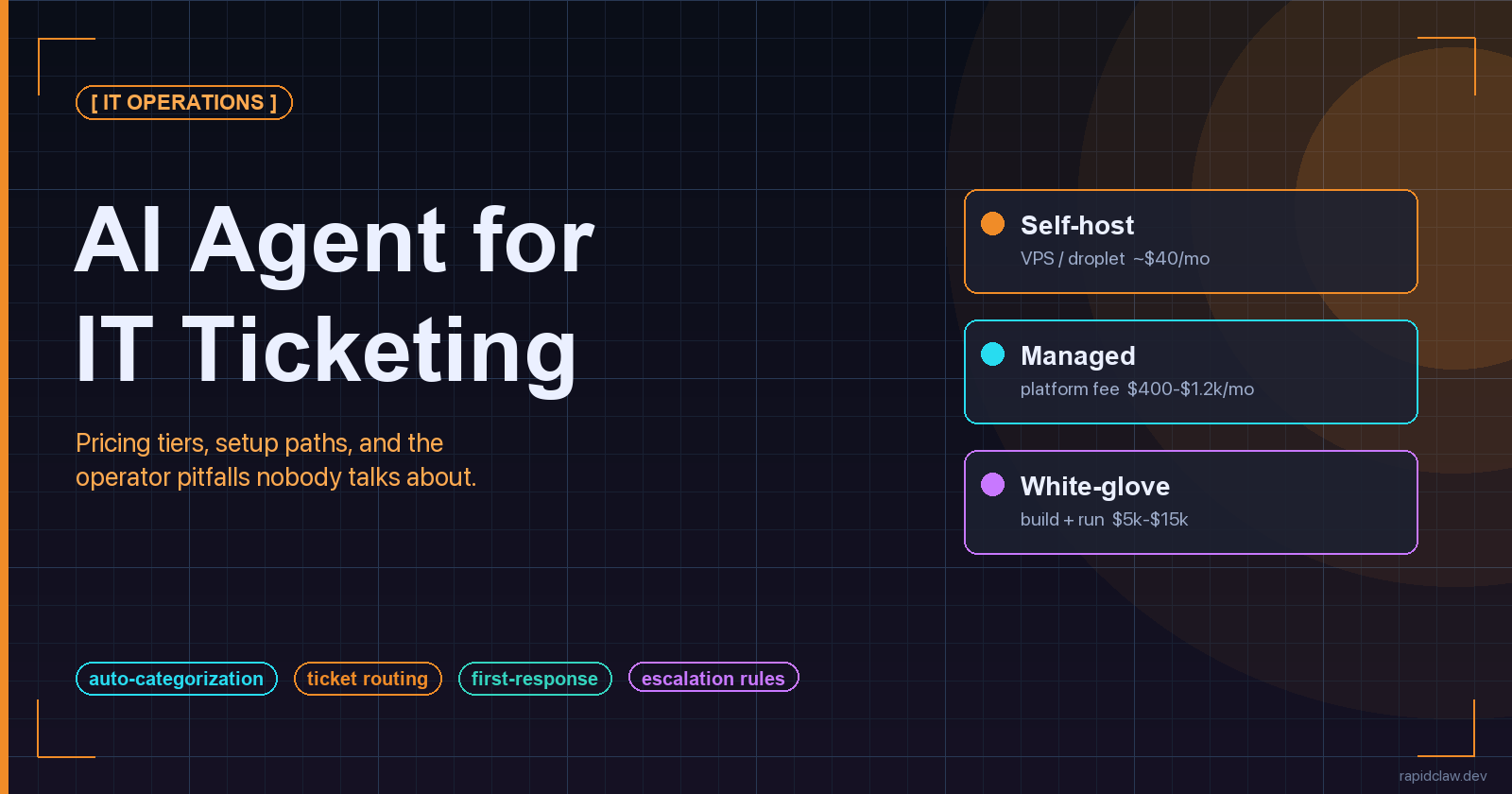
Three pricing tiers in 2026: self-host on a VPS for $40–$120/mo, managed platform for $400–$1,200/mo, white-glove build at $5k–$15k setup plus $300–$800/mo run cost. LLM API spend on top, typically $80–$400/mo at helpdesk volume. The five setup steps that actually decide outcome are connect, seed with resolved tickets, define rules, run shadow-mode for 1–2 weeks, then promote categories one at a time. The four pitfalls that wreck deployments are drift, ticket loops, misconfigured escalation, and over-automation. Skip shadow-mode and you get all four at once.
Pricing across all three tiers, on one page:
[Compare Tiers] Rapid Claw PricingWhat an IT Ticketing Agent Actually Solves
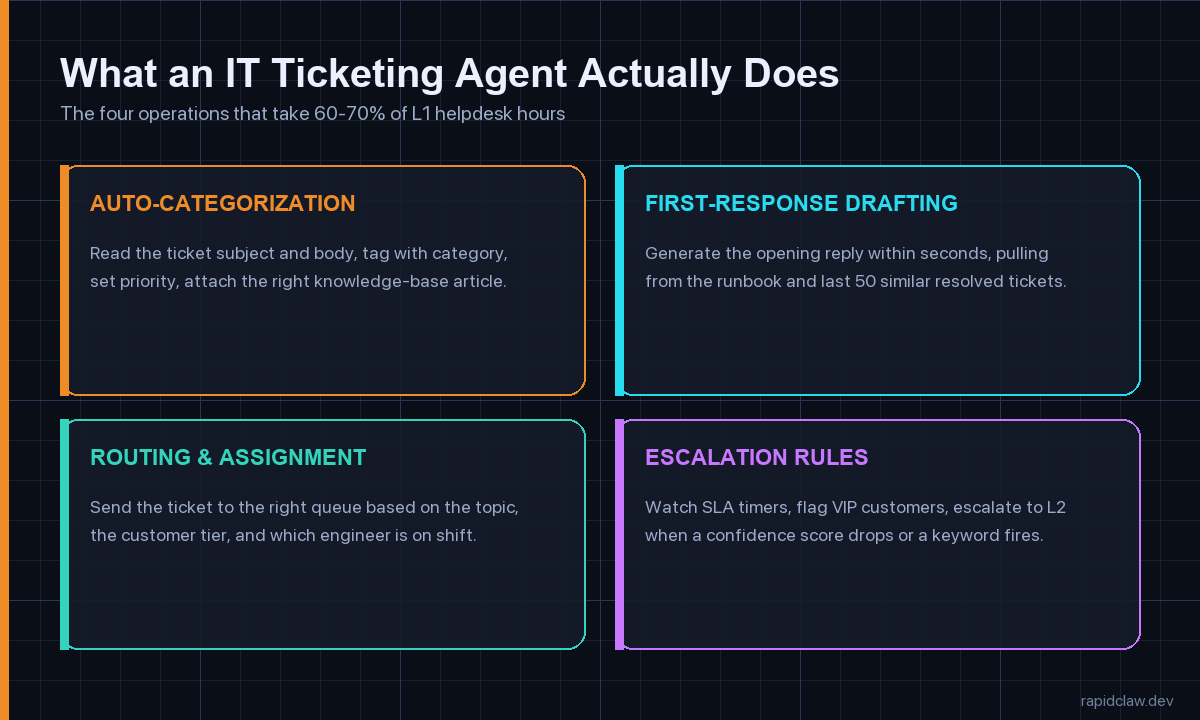
Strip the marketing layer off and the job description for an IT ticketing agent is narrow. It works on four operations, all of which sit firmly in L1 territory, and most of which any reasonably staffed helpdesk team is doing manually right now. The point of automating them isn’t to replace anyone — it’s to free up the humans for the work where their judgment actually matters.
Auto-categorization and tagging
Read the subject line and the body, set a category (password reset, VPN, hardware, software install, network), set a priority, and attach the right knowledge-base article. This is where most of the wall-clock time savings come from. A human triager spends 40–90 seconds doing this on every ticket; the agent does it in 2–4 seconds and catches the obvious stuff with high accuracy.
First-response drafting
Write the opening reply within seconds, pulling phrasing from the runbook and from the last 50 similar resolved tickets. A good agent matches your team’s tone (formal versus casual), follows your boilerplate (start with the customer’s first name, never apologise for things outside your control), and links to relevant docs without inventing URLs. The first-response time SLA on most helpdesks is 4–8 hours; agents drop it to under a minute.
Routing and assignment
Hand the ticket to the right queue based on topic, customer tier, region, and which engineer is on shift. This is the operation that benefits most from real org context — vendor-trained off-the-shelf agents do this badly because they don’t know your team. Even a thin routing layer over your existing helpdesk’s round-robin saves the L2 manager 20–30 minutes a day of manual reassignment.
Escalation rules and SLA watch
Watch SLA timers, flag VIP customers, escalate to L2 when confidence drops, when an outage keyword fires, or when a customer replies a third time. The agents that handle this well are running explicit confidence thresholds, not vibes — anything below 0.7 on the routing classifier auto-escalates with the agent’s draft attached as a starting point for the human.
One clarification before the pricing section, because evaluators get this wrong constantly: an IT ticketing agent is not the same product as a generic customer-service chatbot. The chatbot lives on your marketing site and answers shopping questions; the ticketing agent lives inside your helpdesk and works against tickets that already exist, with internal context the chatbot has no business seeing. The pricing, the setup path and the failure modes are all different. If you’ve been quoted a number that lumps both into one budget line, you’re looking at two products glued together.
Three Pricing Tiers, And How to Pick One
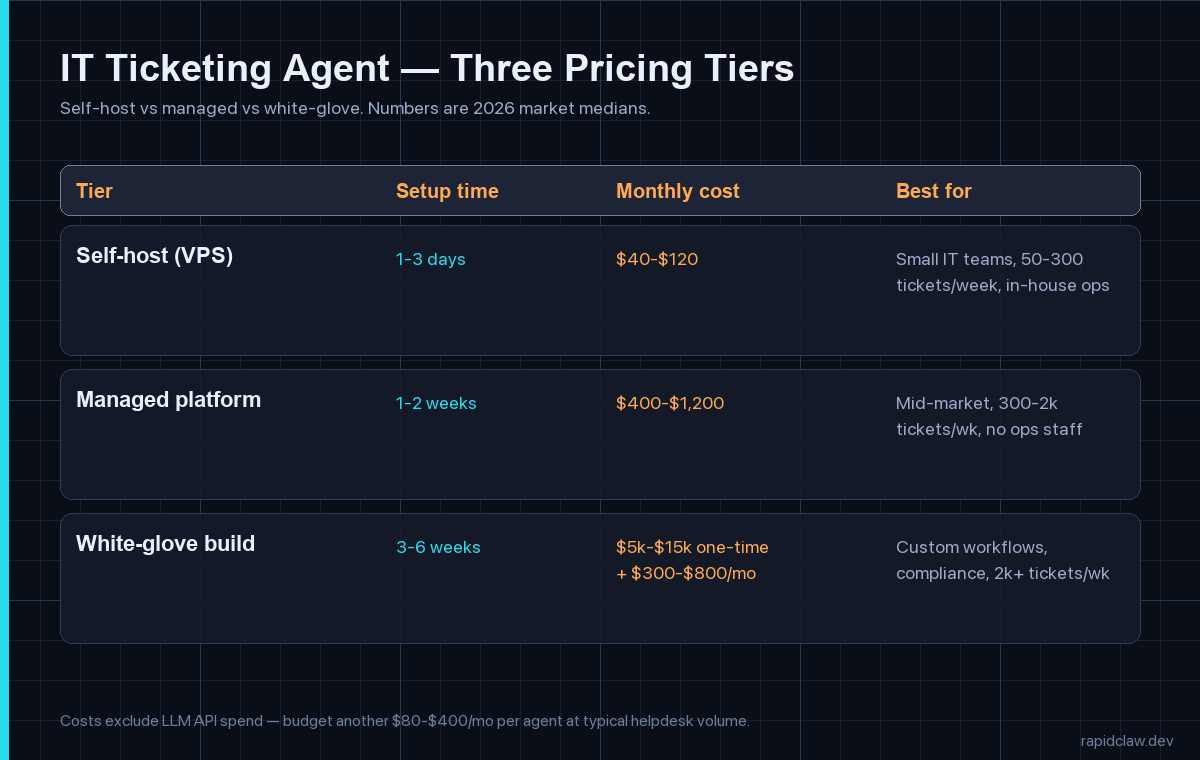
The market in 2026 has settled into three brackets. The numbers below are platform-neutral medians I’ve gathered across the deployments I’ve walked into over the last six months — some self-hosted on commodity hardware, some on managed platforms, a handful of enterprise white-glove builds. They exclude the LLM API spend, which sits around $80–$400 per month per agent at typical helpdesk volume regardless of tier.
Tier 1 — Self-host on a VPS or droplet
$40–$120 per month, 1–3 days to live. A small Linux box, a worker queue, your favourite open-source agent framework, and a webhook from your helpdesk. This is the right tier for a team with somebody who already runs Docker comfortably, a ticket volume between 50 and 300 a week, and standard categorisation needs. The cost ceiling is mostly LLM spend; the box itself is rounding error. The risk is that nobody owns it — if your one Docker-comfortable engineer leaves, the agent goes stale. We have a longer breakdown of the box-and-bandwidth maths in our self-host versus managed cost piece for anyone wanting the full numbers.
Tier 2 — Managed platform
$400–$1,200 per month, 1–2 weeks to live. A vendor handles the hosting, the integrations into your helpdesk, the upgrade path and the on-call. You bring your runbook, your escalation rules, and your knowledge base; the platform brings the connectors, the queue, the observability dashboard and the SOC 2 paperwork. This is the most common tier for mid-market teams between 300 and 2,000 tickets a week, especially the ones without dedicated platform engineers. The cost premium over self-host is real, but so is the time-to-value — you skip a fortnight of plumbing and somebody else is paged when the queue backs up at 3 a.m.
Tier 3 — White-glove custom build
$5k–$15k setup, $300–$800/mo to run, 3–6 weeks to live. This is for teams with an unusual stack, a regulated environment, or a routing matrix that doesn’t fit any vendor’s default. A consultancy or a vendor’s solution team comes in, scopes the workflow with your operations lead, builds against your specifics, runs the shadow phase with you, and hands over a documented system. The setup fee covers the integration work and the compliance review; the monthly is the run cost on top of LLM spend. Worth it if you’re processing more than 2,000 tickets a week or if a wrong reply has compliance implications. Overkill for almost everyone else. Rapid Claw runs this tier as a fixed-fee 30-day build with one senior integrator end-to-end.
One pattern I’ve seen go wrong twice this year: teams skip Tier 1, jump straight to Tier 3 because the budget is there, and never develop the in-house intuition for what the agent is actually doing. Six months later they have a black box, a six-figure annual contract, and no internal ability to debug the thing when it starts mis-routing edge cases. Even if you end up at Tier 3 long-term, running a small Tier 1 deployment first — even just on a single category like password resets — pays back the time investment many times over. The token-economics piece in our breakdown of agent pricing models digs into why per-ticket and per-resolution pricing diverge so dramatically once volume kicks in.
The Five-Step Setup, Without The Marketing
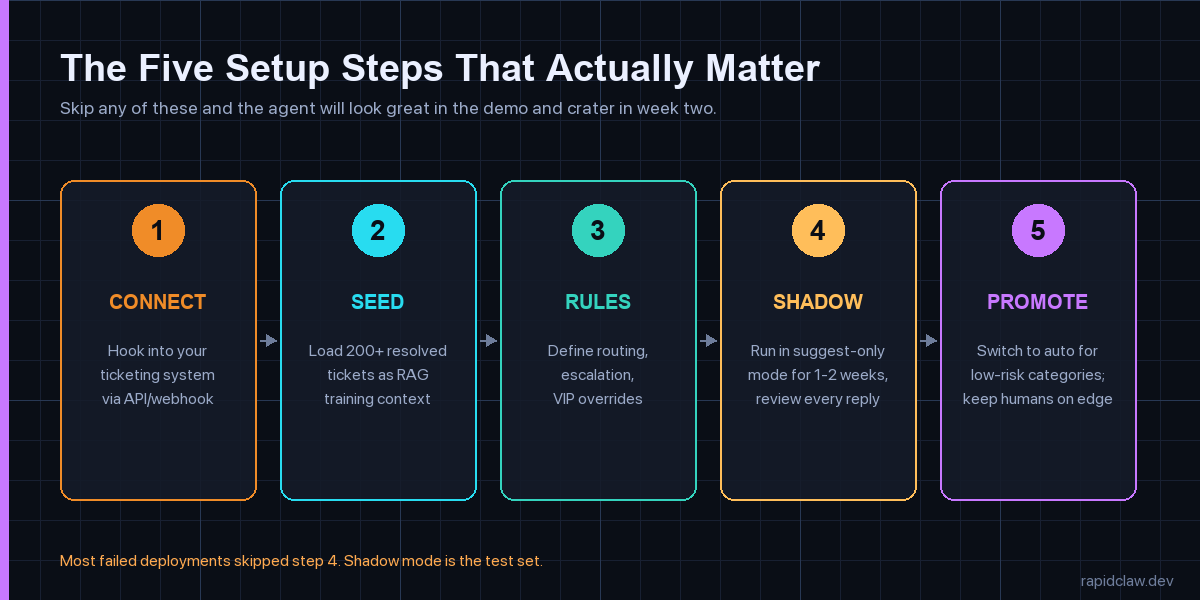
Every deployment that holds up at month six follows roughly this shape, regardless of tier. The order matters. Skipping any of the five steps doesn’t just slow you down; it shifts the failure mode from “works in dev, breaks in prod” to “works for a week, then quietly degrades.”
- Connect. Wire the agent to your helpdesk via the ticketing system’s webhook API. Map your custom fields, your queue list, your priority levels and your customer-tier flags. Most modern systems — Zendesk, Freshdesk, ServiceNow, Jira Service Management, Intercom — expose enough surface area in an afternoon. If you’re on a closed system that only offers email parsing, expect this step to take three days instead of three hours, and the integration to break every time the vendor changes a UI element.
- Seed. Load at least 200 resolved tickets into the agent’s context store as RAG training material. More is better but 200 is the floor below which the agent feels generic. Pick a balanced sample — same proportions across categories that your real ticket flow has — not your 200 most recent ones, which will skew toward whatever incident dominated last week. Re-seed every month so the embedding index doesn’t fall behind your knowledge base.
- Rules. Define routing rules, escalation rules and VIP overrides in plain language, then translate them into the agent’s policy layer. Be explicit about confidence thresholds — we default to 0.7 for routing and 0.85 for auto-reply. Write down the keywords that always escalate (outage, breach, lawsuit, regulator). Test escalation paths with synthetic tickets before going near a real customer.
- Shadow. Run the agent in suggest-only mode for 1–2 weeks. The agent drafts replies and routing decisions; humans approve, edit, or reject each one. This is the most important step in the entire deployment, and the one teams skip most often because the demo looked good. Track the override rate per category. Anything above 25 percent gets reworked before promotion. Anything below 5 percent is suspicious — either you’re looking at a category that doesn’t need an agent, or your reviewers have started rubber-stamping.
- Promote. Switch categories from suggest-only to auto-reply one at a time, lowest-stakes first. Password resets and known-software-bug responses go first; security incidents and customer-cancellation threats stay human-in-the-loop indefinitely. Watch CSAT, complaint volume and reopen rate weekly for the first two months. If any of those move the wrong way, the last category you promoted is the suspect.
None of these steps require a senior engineer if your tier is right for your team. They do all require somebody who owns the deployment full-time for a few weeks. The most expensive deployment failure I’ve watched in 2026 was a team that bought Tier 2, assigned setup to a rotating on-call slot, and ended up with five different people each having taken half a step. Six weeks later they were still in shadow mode and nobody could remember why a particular routing rule existed. The fix was easy — assign one owner — but the rework cost them a month.
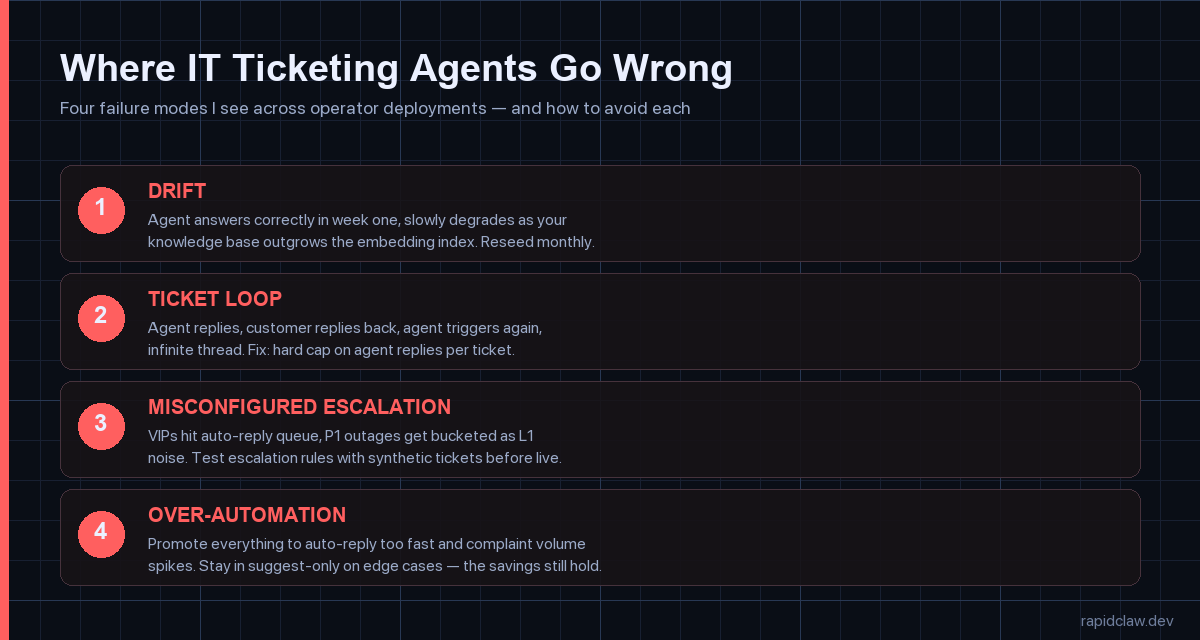
Four Pitfalls Every Operator Hits
1. Drift — the agent ages out of date
Knowledge base updates land, the embedding index lags, and the agent starts confidently citing documentation that no longer exists. By month three the override rate climbs without anyone noticing because the misroutes look correct on the surface. Fix: re-embed monthly, review override rates per category weekly, and put a calendar reminder on it. We dig into the broader pattern in our piece on why agents fail in production.
2. Ticket loop — the infinite reply chain
Agent replies, customer replies back, agent triggers again, agent replies, and now you have a 14-message thread on a single ticket. This eats tokens and confuses customers. Fix: hard cap the number of agent replies per ticket at two or three. Anything beyond that auto-escalates to a human regardless of confidence score. The cap should live in your policy layer, not in your prompt — prompts get edited, policies get audited.
3. Misconfigured escalation — the silent VIP miss
Three weeks in, somebody notices that an enterprise customer’s tickets have been hitting the L1 auto-reply queue instead of the named-account-manager queue. Or a P1 outage was bucketed as a routine network ticket because the keyword list missed a phrase. Fix: synthetic-ticket testing before launch and weekly thereafter. Generate ten test tickets covering your top-five escalation paths and run them through the agent end-to-end. Cheap, catches it.
4. Over-automation — promoting too fast
Demo went well, leadership wants the headline number, the team promotes everything to auto-reply at once. Two weeks later customer complaints spike on edge cases the shadow phase didn’t cover. Fix: stage the promotion. Move one category at a time, watch the metrics for a week, then move the next. The teams that show the cleanest results in our internal data stayed in suggest-only on roughly 20–30 percent of categories indefinitely.
What Working Deployments Have In Common
Across the IT helpdesk deployments I’ve been close to in the last year, the ones that hold up at the six-month mark share four traits that have nothing to do with which platform they picked. They all kept a named owner on the agent for at least the first quarter. They all stayed in suggest-only mode on at least one fifth of their categories indefinitely — usually the categories where a wrong answer creates compliance or reputation risk. They all instrument override rate, reopen rate and CSAT per category, not just in aggregate. And they all have a documented policy layer, separate from the prompt, that captures the rules a human can read and an auditor can sign off on.
The deployments that quietly fall apart are usually missing one or more of those. The most common pattern is a team that nailed the technical setup, ignored the operational one, and ended up with a working agent and no organisational muscle to keep it working. A ticketing agent isn’t a thing you turn on. It’s a colleague you onboarded, with all the same caveats — show it the playbook, watch its work for a few weeks, hand over more responsibility as it earns trust, keep a regular check-in on how it’s doing.
On the platform-neutral question of which tier to start with: if your ticket volume is under 300 a week and you have somebody comfortable in a terminal, run a self-hosted pilot on the cheapest tier first. You’ll learn more in three weeks than any vendor demo will tell you, and the eventual conversation about whether to graduate to a managed tier will be informed by your actual numbers rather than a sales deck. Our broader hosting and deployment comparison walks through the cross-over point in detail.
Frequently Asked Questions
Pricing for all three tiers, on one page
Self-host, managed, white-glove. Rapid Claw publishes the deltas so you can pick the tier before you commit, not after.
[See Pricing] Compare TiersRelated reading
Box-and-bandwidth maths for the Tier 1 path
AI agent pricing models comparedPer-seat, per-resolution, per-task — how the maths shifts at volume
AI agent hosting — the complete 2026 guideRailway, Modal, RunPod, VPS — where ticketing agents fit
Why AI agents fail in productionThe drift problem and four other failure modes, explained
Rate limiting and cost guardrails for agentsToken throttling, circuit breakers, and the ticket-loop fix
Scaling support capacity with an agent — case studyDTC brand parallel; same playbook, different vertical
Agentic commerce & shopping agentsWhere ticketing meets buying: agents that resolve and transact in one loop